

10 Best Practices to Prevent Affiliate Abuse
You log into your affiliate dashboard, see a big jump in commissions, and feel great for about ten seconds.
Then you look closer and the sales do not match the traffic. That gap is affiliate abuse, and it quietly drains real money from program owners every month.
The good news is that most of it is preventable with settings you already control. Today, we’ll discuss ten practical ways to lock things down.
Key Takeaways: Prevent Affiliate Abuse
- Affiliate abuse is any tactic an affiliate uses to earn commissions they did not honestly generate.
- Around 22% of global digital ad spend was lost to ad fraud in 2023, roughly $84 billion, and affiliate channels take a share of that.
- Self-referrals are the most common abuse in small programs, and one toggle stops them.
- Manual approval lets you screen every applicant before they touch your tracking.
- Keeping referrals in pending status means nothing gets paid until you say so.
- Your visits log is a free fraud detector if you actually read it.
- You do not need an enterprise fraud engine to run a clean program; you need tight settings and a habit of reviewing before you pay.
What Is Affiliate Abuse?
Affiliate abuse is when an affiliate breaks your program rules or games the tracking system to earn commissions they did not honestly generate. It covers everything from buying through their own link to faking clicks with bots.
Most of it falls into a handful of buckets:
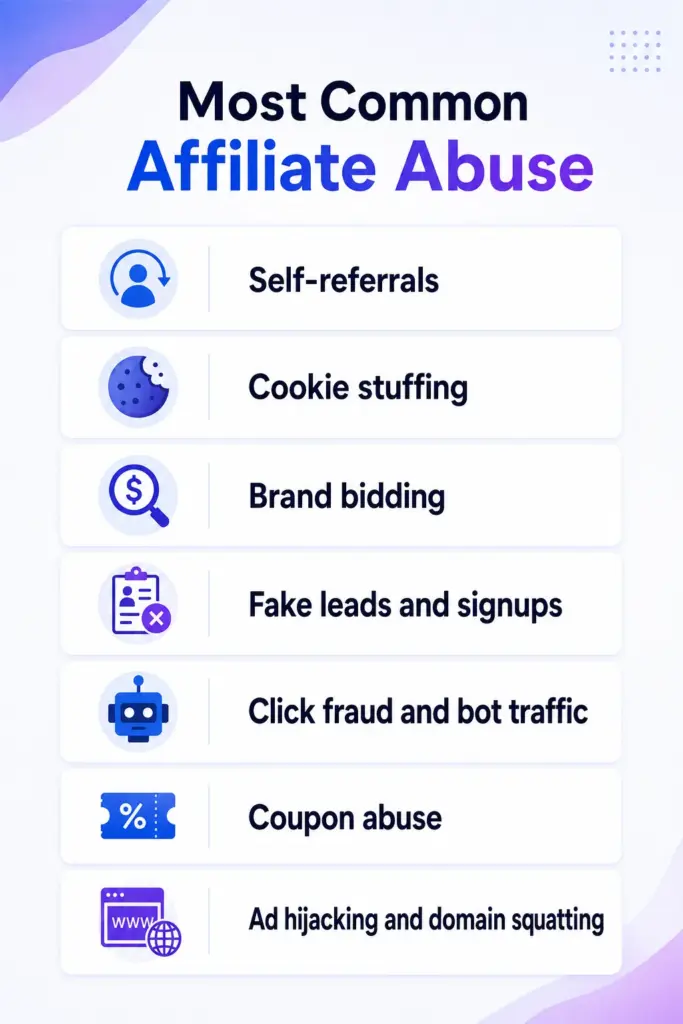
- Self-referrals: an affiliate buys your product through their own link to pocket the commission, sometimes with a discount on top.
- Cookie stuffing: dropping affiliate cookies on people who never clicked a real link, so the affiliate claims credit for sales they never drove.
- Brand bidding: running paid ads on your own brand name to hijack traffic that was already coming to you.
- Fake leads and signups: filling forms with junk data when you pay per lead.
- Click fraud and bot traffic: software that generates clicks to inflate visit counts.
- Coupon abuse: posting “exclusive” codes on public coupon sites to skim sales that would have happened anyway.
- Ad hijacking and domain squatting: cloned pages or look-alike domains that intercept your buyers.
Honestly, you will not see all of these in a small WordPress program. But you only need to get burned once before you start caring about the settings below.
Why Affiliate Abuse Hits Self-Hosted Programs Harder
Here is the uncomfortable part. Affiliate marketing keeps growing, and so does the fraud riding along with it. Affiliate spend is projected to climb from about $37.3 billion in 2025 to $42.6 billion in 2026, with brands earning roughly $12 to $15 for every dollar spent, according to TrafficGuard. Money that big attracts bad actors.
The scale of the problem is real. Around 22% of global digital ad spend was lost to ad fraud in 2023, totaling roughly $84 billion, per Juniper Research data covered by Search Engine Land.
One estimate put 17% of affiliate traffic in 2022 as fraudulent, costing companies about $3.4 billion, as compiled by ElectroIQ.
And it is on most owners’ minds: 67% of brands say they worry about fraud, while 31% have actually experienced it, based on Influencer Marketing Hub figures cited by EntrepreneursHQ.
Now think about your setup. You are running the program yourself. There is no fraud-analytics team watching dashboards at 2 a.m.
The classic cautionary tale is the eBay case against super affiliate Shawn Hogan and his company, Digital Point Solutions, a landmark cookie-stuffing scheme.
eBay had a fraud team and still got hit for years.
10 Ways to Prevent Affiliate Abuse That Work
So the answer for a solo operator is not to buy an enterprise fraud platform. It is to use the controls in your plugin properly and build a simple habit of reviewing before you pay. Let’s get into it.
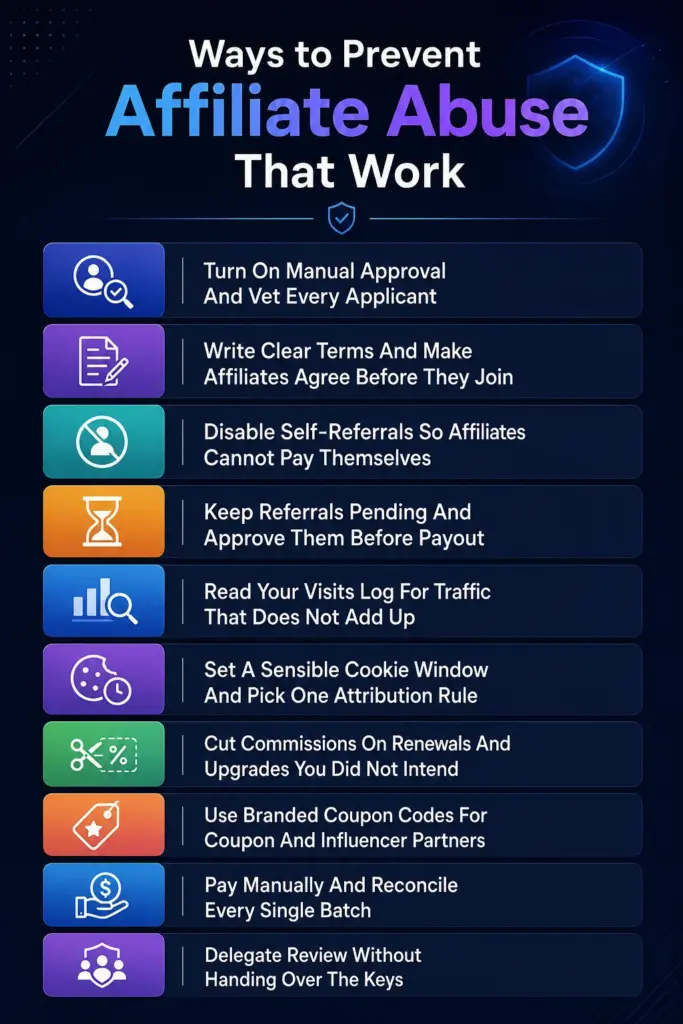
1. Turn On Manual Approval And Vet Every Applicant
The cheapest fraud prevention is not letting fraudsters in. By default, you can let anyone sign up and start generating links instantly, which is convenient and risky.
In FluentAffiliate, head to your registration settings and switch on “Require admin approval for new affiliates.” Now every new applicant lands in pending status instead of going live. You decide who gets in.
When you review an application, actually look at it. The registration form can ask how they plan to promote you and for a website URL. Use that. A blank promotion plan, a dead website, or a Gmail address with no online footprint is a fine reason to leave someone pending. You can manage all of this from the affiliates page, where pending applicants sit until you approve or reject them.
This one step filters out a surprising amount of trouble before it ever starts.
Read More: A Complete Awareness Guide on Affiliate Fraud
2. Write Clear Terms And Make Affiliates Agree Before They Join
You cannot enforce rules you never wrote down. A solid terms and conditions page is your legal and practical backbone, and it is the first line of fraud prevention.
Spell out exactly what is not allowed. At a minimum:
- No bidding on your brand name in paid ads.
- No posting affiliate links or codes on public coupon sites.
- No self-purchases through your own link.
- No cookie stuffing, forced clicks, or bot traffic.
- No unsolicited email or spam promotion.
Then state the consequence: violators forfeit commissions and get removed. FluentAffiliate lets you assign a terms and conditions page that affiliates must accept during registration, so agreement is built into signup, not an afterthought. When someone breaks a rule later, you are not arguing; you are pointing at the document they checked a box on.
Read In-depth: How to Set Up Affiliate Terms and Conditions for Your Affiliate Program
3. Disable Self-Referrals So Affiliates Cannot Pay Themselves
If you do one thing today, do this. Self-referrals are the most common abuse in small programs because they are easy and feel harmless to the person doing them. An affiliate signs up, then buys your product through their own link to grab the commission, sometimes stacking a coupon for a double dip.
FluentAffiliate has a direct switch for this. In your referral settings, turn on “Disable Self Referral.” Now, an affiliate who buys through their own link earns nothing on that purchase. No awkward conversation, no manual clawback, just a rule the system enforces every time.
It takes about five seconds and closes the single most common leak.
4. Keep Referrals Pending And Approve Them Before Payout
Speed is the enemy of clean books. If commissions auto-approve the second a sale fires, you lose your window to catch anything wrong.
FluentAffiliate gives every referral a status: Pending, Unpaid, Paid, or Rejected. Use it as a workflow, not just a label. New or suspicious referrals can sit in pending while you confirm the sale was real and stuck (no refund, no chargeback).
When you are confident, you approve it into unpaid so it becomes eligible for the next payout. If something smells off, you reject it and no commission is owed. You can edit the amount or change the status from the managing referrals page.
The key idea: nothing gets paid automatically. A payout only pulls in approved, unpaid referrals, which means your review is always the gate.
5. Read Your Visits Log For Traffic That Does Not Add Up
Your visits log is basically a free fraud detector, and most owners never open it. Every click on an affiliate link gets logged with the destination URL, the referrer, UTM data, and whether it converted.
Here is what to look for:
- Hundreds of visits and almost zero conversions from one affiliate. Could be normal, could be padded clicks.
- A flood of visits that all share the exact same referrer or no referrer at all.
- Conversions that pop right after a sudden burst of clicks, which is a cookie-stuffing fingerprint.
- Traffic from referrers that have nothing to do with how the affiliate said they would promote you.
Filter by Converted and Not Converted to compare quality fast. None of these signals proves fraud on its own, but a stack of them on one affiliate is your cue to put their referrals in pending and ask questions before paying.
6. Set A Sensible Cookie Window And Pick One Attribution Rule
Long attribution windows feel generous, but they also widen the door for stale or hijacked credit. If your cookie lasts ninety days, an affiliate can claim a sale that happened almost three months after a single click, even though something else actually closed it.
In referral settings, set a cookie duration that matches your real buying cycle. Thirty days is a reasonable default for most products. You also choose whether the First Affiliate or the Last Affiliate gets credit. Pick one and document it in your terms. A clear rule kills the “I clicked first” versus “I clicked last” disputes that cookie stuffers love to exploit, because everyone already knows how credit works.
Tighter windows plus one written rule means fewer junk commissions and fewer arguments.
Explore More: Cookie Duration in Affiliate Marketing: Find What, Why, and How
7. Cut Commissions On Renewals And Upgrades You Did Not Intend
This one is sneaky because it looks legitimate on the surface. If you sell subscriptions or tiered products, an affiliate can keep earning on renewals and upgrades they had nothing to do with, padding their numbers month after month.
Decide on purpose what you actually want to pay for. FluentAffiliate’s e-commerce integrations give you control here. The WooCommerce integration, along with Easy Digital Downloads and FluentCart, includes a “Disable Referrals on Upgrades” option. Turn these off unless you specifically want to reward recurring referrals.
If you do want to reward renewals, that is a deliberate choice you set, not a default you forgot about while an affiliate quietly collected.

Get the Most Reliable Affiliate Tracker for WordPress
8. Use Branded Coupon Codes For Coupon And Influencer Partners
Open referral links are easy to abuse with cookie stuffing. Coupon codes are not, because credit is tied to the code actually being used at checkout, not to a cookie sitting in someone’s browser.
For influencers, podcast hosts, and partners who post a code, FluentAffiliate’s branded coupon feature is cleaner. On WooCommerce, EDD, and FluentCart you can create a normal discount code and assign it to a specific affiliate. When a customer uses that code, the affiliate gets credited automatically. There is nothing to stuff and nothing to hijack.
One guardrail: the person has to be an approved affiliate first before you can attach a coupon to them. You can also organize promotional assets in affiliate creatives so partners share the materials you actually approved, not whatever they cook up on their own.
9. Pay Manually And Reconcile Every Single Batch
Some owners see “manual payouts” as a limitation. For fraud control, it is a feature.
FluentAffiliate records and reports payouts but does not push money through a gateway automatically. That means a human, you, reviews who is getting paid and how much before any cash moves. When you create a payout from the payout management page, you choose the affiliates, set a date range, and can set a minimum payout amount so tiny or suspicious balances do not auto-flow out.
Before you send anything, export the CSV and skim it. Does any one affiliate’s total look wildly out of line with their visits and conversions? Does the math match what you saw during the period? This five-minute reconciliation is your last line of defense, and it works precisely because nothing pays itself.
10. Delegate Review Without Handing Over The Keys
As you grow, you will want help reviewing referrals and approving affiliates. The mistake is giving a teammate or a virtual assistant full WordPress admin access just to do that.
FluentAffiliate’s permission management lets you create managers with scoped access. You can grant read-only access to affiliates and referrals, or read-and-write access to approve and reject, without exposing your global settings or the rest of your site. A manager only sees the menus their permissions allow.
When you do find a bad actor, act fast. Reject their open referrals so nothing is owed, and delete the affiliate to cut off future links. You can also use affiliate groups to keep your highest commission rates reserved for trusted, proven partners rather than handing top rates to everyone on day one. Turning on the admin sale notification in your notification settings keeps you in the loop in real time, so a strange sale is something you see today, not next month.
A Quick Prevention Checklist
Run through this once and you have covered the basics:
- Manual approval is on, and you actually vet applicants.
- Your terms & conditions ban brand bidding, spam, self-purchases, & bots.
- Self-referrals are disabled.
- Referrals stay in pending until you approve them.
- You read the visits log before every payout.
- Cookie duration and attribution rule are set and documented.
- Renewal and upgrade commissions are intentional, not accidental.
- Coupon partners use branded codes, not open links.
- You reconcile the CSV before sending money.
- Helpers have scoped manager access, not full admin.
Explore Tools: 7 Best Affiliate Fraud Detection Software for WordPress
Final Thoughts
Affiliate abuse is not some rare event that happens to other people. With billions lost to ad fraud every year, it is a steady tax on programs that leave the doors open. But you do not need a security budget or a fraud-detection vendor to run a clean operation. You need manual approval, clear terms, self-referrals disabled, a pending-first review habit, and the discipline to read your data before you pay.
Most of these controls are already sitting in FluentAffiliate, waiting for you to switch them on. If you are running an in-house program on WordPress, take twenty minutes today to walk through your referral settings and registration settings and tighten each one. Your future self, and your payout balance, will thank you.
Frequently Asked Questions
What is affiliate abuse?
Affiliate abuse is any tactic an affiliate uses to earn commissions they did not honestly generate. It includes self-referrals, cookie stuffing, brand bidding, fake leads, click fraud, and coupon abuse. It costs program owners real money and distorts which partners actually drive sales.
What is the most common type of affiliate fraud in small programs?
Self-referrals are the most common. An affiliate buys your product through their own link to claim the commission, sometimes stacking a discount code on top. The simplest fix is to disable self-referrals in your affiliate plugin so those purchases never earn anything.
Can you prevent affiliate fraud completely?
No, you cannot eliminate it entirely, but you can reduce it sharply. A combination of applicant screening, clear terms, disabled self-referrals, pending-status review, and manual payout reconciliation stops the large majority of abuse seen by self-hosted programs.
Does FluentAffiliate have built-in fraud detection?
FluentAffiliate gives you prevention controls rather than an automated fraud-scoring engine. You get manual approval, a self-referral block, pending and rejected referral statuses, a detailed visits log, and manual payouts. Those controls, used with a review habit, are what keep a program clean.
How do I stop affiliates from buying through their own links?
Turn on “Disable Self Referral” in your FluentAffiliate referral settings. Once enabled, any purchase an affiliate makes through their own referral link earns no commission, which closes the most common abuse in small programs without any manual work.
Should I approve affiliates automatically or manually?
Manual approval is safer for most programs. It places new applicants in pending status so you can review their website, traffic sources, and promotion plan before they generate a single link. Automatic approval is faster but lets unvetted accounts straight into your tracking.
How do I catch cookie stuffing?
Read your visits log. Cookie stuffing usually shows up as a high volume of visits with very few or oddly timed conversions, traffic from a single referrer or no referrer, and conversions that spike right after a click burst. Stack those signals on one affiliate and hold their referrals for review.




Add your first comment to this post