
Affiliate Onboarding: How to Turn New Signups Into Active Promoters
You approved a fresh batch of affiliates last week. Felt good. Then you checked the dashboard, and nothing moved. No clicks, no referrals, no sales. Just names sitting in a list.
That is the part nobody warns you about. Getting people to sign up is the easy half. Getting them to actually promote you is where most programs quietly stall before they ever earn a dollar.
Key Takeaways: Affiliate Onboarding
- Affiliate onboarding is the work you do to turn a new signup into an active, promoting partner, and it is separate from registration.
- Roughly 38% of newly onboarded affiliates never generate a single conversion in their first 90 days, so the gap is real.
- Registration is the affiliate’s action, onboarding is your job, and activation is the result you are aiming for.
- Most onboarding success comes from setup you do once: approval rules, commission groups, ready-made creatives, and automatic emails.
- The per-affiliate process is short: approve, welcome, get them their link, hand over creatives, assign their group, confirm tracking, follow up.
- Running your program on your own WordPress site means you own the data, the approval queue, and the affiliate relationship with no per-affiliate platform fees.
- The fastest way to kill activation is information overload, broken tracking, or silence after approval.
What Is Affiliate Onboarding?
Affiliate onboarding is the process of getting a newly approved affiliate set up, informed, and ready to promote your products, from the moment they join to the moment they make their first referral. In plain terms, it is everything that happens after someone says “I want to promote you” and before they actually do it well.
Here is the distinction people miss. Onboarding is not the signup form. The signup form is registration, which is the affiliate’s job. Onboarding is your job. It covers approving them, showing them where their link lives, handing them assets, setting clear commission expectations, and nudging them toward that first promotion. Skip it, and you have a list of contacts, not a sales force.
Why Affiliate Onboarding Decides Whether Your Program Works
Onboarding is the single biggest lever between “I have affiliates” and “my affiliates make me money.” And the numbers back that up. Around 38% of newly onboarded affiliates generate zero conversions within 90 days of activation, according to Track360’s 2026 affiliate industry data. That is more than a third of your partners going completely dark before they ever send a sale.
Think about what a signup actually represents. Someone raised their hand. They are interested, they trust you a little, and they have an audience. That is the hardest thing to find in affiliate marketing. If a third of those people never promote anything, you are not losing tire-kickers. You are losing warm, willing partners because the handoff was clumsy.
A signup is potential. Activation is revenue. Onboarding is the bridge. And the good news is that bridge is mostly mechanical, which means it is fixable. You do not need to be charming or run a webinar series. You need a process that gets people from approved to promoting without friction.
Onboarding vs Registration vs Activation
Most guides conflate these three words, which makes the whole topic feel vaguer than it is. They are not the same thing, and separating them tells you exactly where your program is leaking.
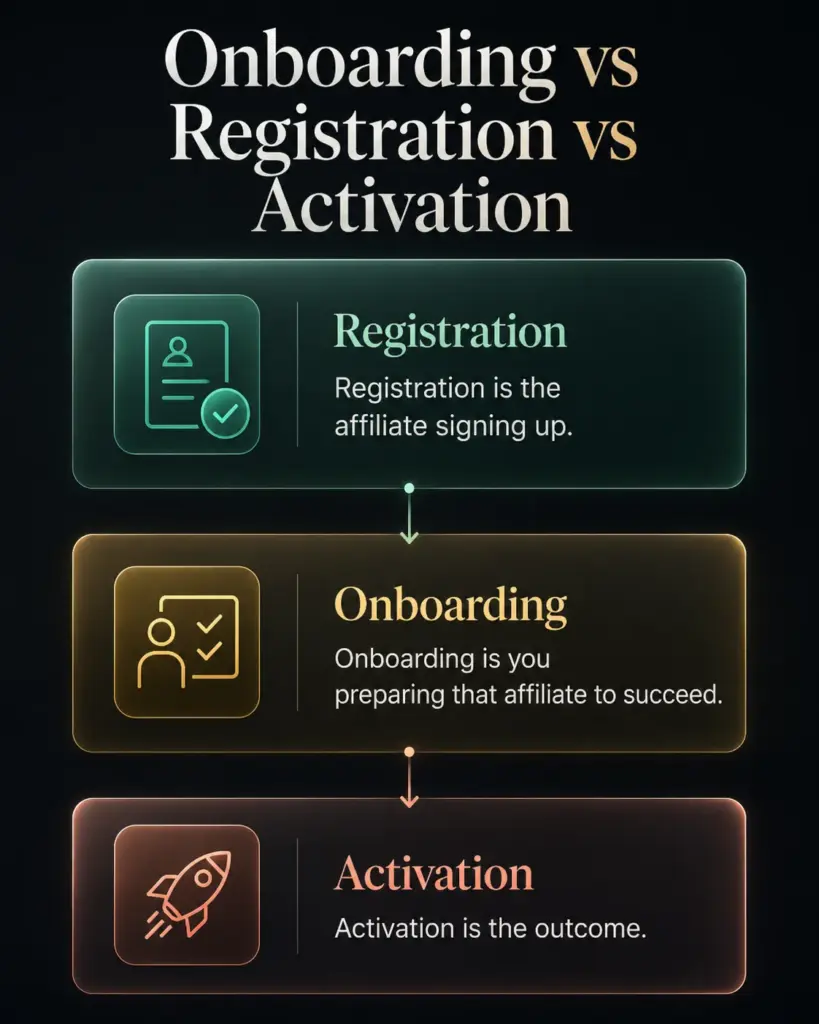
- Registration is the affiliate signing up. They fill out your form, agree to your terms, and request to join. This is their action, and you control how easy it is.
- Onboarding is you preparing that affiliate to succeed. Approving them, sending the welcome, pointing them to their link and your creatives, and setting commission expectations. This is your action.
- Activation is the outcome. The affiliate sends their first click, then their first referral. This is the result you are optimizing for.
So when someone asks “why is my program not working,” the honest answer is usually “which of these three is broken?” Plenty of registrations but no onboarding means dead accounts. Good onboarding but no activation means your offer or commission needs work. Pinning the stage matters more than any single tactic.
The Setup You Do Once (So Onboarding Is Smooth Every Time)
The smartest move in affiliate onboarding is to do most of the work before anyone signs up. Set the system up once, and every new affiliate gets a clean experience automatically. Here is what that groundwork looks like.
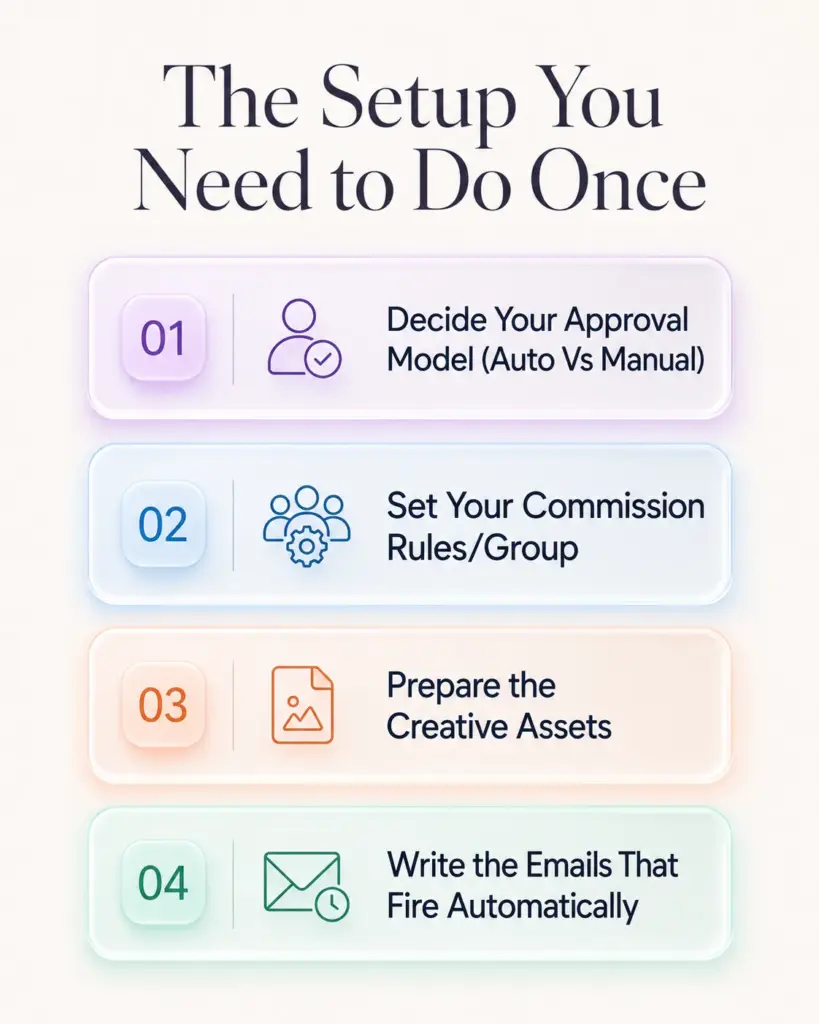
Decide Your Approval Model (Auto Vs Manual)
First decision: does a human review applications, or does the system approve everyone instantly? Both are valid, and the right answer depends on your risk.
Manual approval means new applicants land in a pending state and wait for you to review them. It is the better choice if you want to screen for spammy sites, protect your brand, or run a smaller curated program. Automatic approval means anyone who completes the form becomes an active affiliate immediately and can start generating links right away. That works well when volume matters more than vetting, like a customer referral program.
In a tool like FluentAffiliate, this is a single toggle in your registration settings. Pick deliberately, because it sets the tone for everything downstream. Manual gives you control but adds a delay, and delay is where enthusiasm cools.
Set Your Commission Rules and Groups Before Anyone Signs Up
Nothing confuses a new affiliate faster than not knowing what they earn. Lock your commission structure down first. Set your default rate, decide if it is a flat amount or a percentage, and pick your cookie duration so attribution is clear.
If you plan to pay different affiliates different rates, build those groups ahead of time too. Maybe your influencers earn more than your customer referrals. In FluentAffiliate, you create affiliate groups with their own rates and then assign an affiliate to a group from their profile.
Prepare the Assets Affiliates Need on Day One
A new affiliate with no materials is a new affiliate who does nothing. The blank-page problem is real. So stock the shelf before they arrive.
This is where creatives come in. Banners, text links, QR codes, the stuff they can grab and post without designing anything themselves. In FluentAffiliate you build these in the affiliate creatives section, and the affiliate’s tracking link is baked in automatically, so credit is never lost.
You can make a creative public to everyone or keep it private to a specific group, and you can even schedule a promo creative to appear and disappear on set dates for a seasonal sale. Have at least a few ready before you open the doors.
Write the Emails That Fire Automatically
The first hour after approval is when an affiliate is most motivated. Catch that moment with an email instead of leaving them to figure things out. At minimum, you want a welcome or account-approved message that hands over the essentials: where to log in, their referral link, the commission rate, and where to find materials.
FluentAffiliate ships event-triggered notifications for exactly these moments, including a New Affiliate Signup email, an Application Pending email, and an Account Approved email, all editable from your notification settings.
If you want a proper nurture sequence that spaces out tips over the first two weeks, you would pair it with FluentCRM, which has dedicated FluentAffiliate triggers like New Affiliate Created. Native notifications cover the must-know basics. Drip is a layer you add if you want it.
The Per-Affiliate Onboarding Process, Step by Step
Once the groundwork is in place, onboarding each new affiliate is fast. Here is the repeatable sequence from pending to promoting.
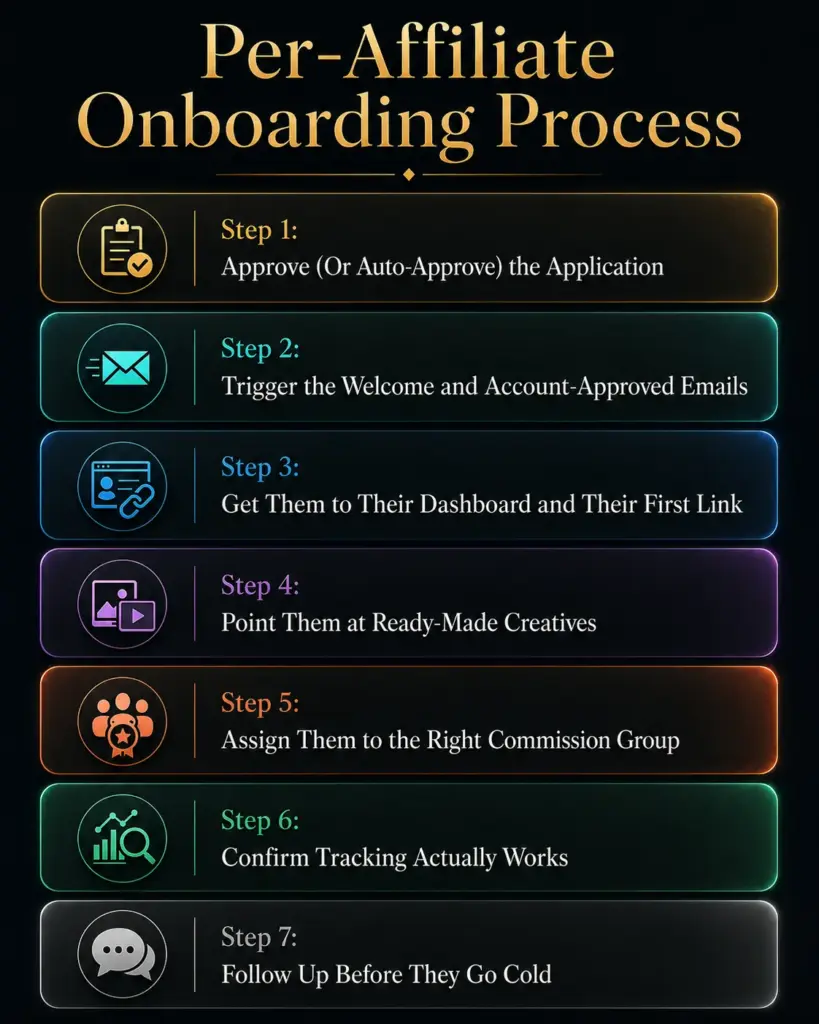
Step 1: Approve (Or Auto-Approve) the Application
If you chose manual approval, do not let applications sit. Review the application, check their site or promotion method, and approve or reject. In FluentAffiliate you handle this from the managing affiliates screen, where pending applicants are filtered into their own tab and a quick edit flips their status to active. Speed matters more than you think. An affiliate approved within a day is still excited. An affiliate approved a week later has often forgotten they applied.
Step 2: Trigger the Welcome and Account-Approved Emails
The moment you approve, the account-approved email should go out. This is the handoff. Make sure it contains the four things every new affiliate needs immediately: a login link, their referral link, their commission rate, and a pointer to your creatives. Keep it short and skimmable. Nobody reads a wall of text on day one, and a cluttered welcome is a quiet way to lose people before they start.
Step 3: Get Them to Their Dashboard and Their First Link
Your affiliate’s dashboard is home base. It is where they grab their link, watch their stats, and check earnings. A good onboarding flow gets them there fast and shows them the one thing they came for: their referral link.
Every approved affiliate gets a default link automatically, and they can also paste any page URL to generate a link to a specific product or post. Point them at this early. The faster an affiliate copies their first link and shares it somewhere, the more likely they are to ever become active. That first share is the real activation moment, not the signup.
Step 4: Point Them at Ready-Made Creatives
Now connect them to the assets you prepared. A short line in your welcome email like “grab a banner or QR code from your Creatives tab” removes the blank-page excuse entirely. Affiliates who have something to post tend to post it. Affiliates staring at an empty editor tend to close the tab.
Since each creative already carries their tracking link, there is nothing for them to configure and no way for credit to slip.
Step 5: Assign Them to the Right Commission Group
If you run different rates for different partner types, assign the new affiliate to their group now, while you are already in their profile. An influencer with a bigger audience might sit in a higher-rate group. A standard customer referral sits in the default.
In FluentAffiliate you set this from the affiliate’s profile using the group you built earlier, and the group’s rate applies to them automatically from that point on. Doing it during onboarding means the affiliate’s very first referral is calculated correctly, and you avoid awkward “wait, that is the wrong rate” conversations later.
Step 6: Confirm Tracking Actually Works
This is the step almost every onboarding guide skips, and it is the one that burns programs. Before you celebrate, confirm that clicks and referrals are actually being recorded. Have a test click run through an affiliate link and check that it shows up. Your visits log is where you verify this.
In FluentAffiliate, the visits page records every click with its source, and a converted vs not-converted filter shows you which clicks turned into sales. If a test click does not appear, you have a tracking problem to fix now, not after your best affiliate emails you asking where their commission went. Broken tracking does not just cost one sale. It costs you the trust of the affiliate who noticed.
Step 7: Follow Up Before They Go Cold
A week in, check the data. Did the affiliate generate any clicks? If yes, great, a quick “nice start, here is what is working” note keeps momentum. If no clicks at all, that is your cue to reach out personally and ask if they need anything. Maybe they are busy, maybe they are stuck, maybe they need a different creative.
This single follow-up is what rescues a big chunk of that 38% who would otherwise vanish. It does not need to be fancy. It needs to exist.
An Affiliate Onboarding Checklist You Can Reuse
Here is the process boiled down so you can run it the same way every time. Two lists, because two people are doing the work.
What you, the owner, do for each new affiliate:
- Review and approve (or confirm auto-approval) within 24 hours.
- Confirm the account-approved email fired with link, rate, login, and creatives pointer.
- Assign the affiliate to the correct commission group.
- Run a test click and confirm it lands in your visits log.
- Check back at day 7 and reach out if there are zero clicks.
What you want the affiliate to do in their first 30 days:
- Log in and copy their main referral link.
- Generate at least one product-specific or post-specific link.
- Grab one creative and post it somewhere real.
- Confirm their payment email is correct in settings.
- Send their first promotion and watch for their first click.
Print it, paste it into a doc, whatever. The point is consistency. A process you actually follow beats a brilliant one-off every time.
Doing This on a Self-Hosted WordPress Program
Most onboarding advice online quietly assumes you are paying a hosted network that takes a cut and rents you access to your own affiliate data. Running the program yourself on WordPress changes the math in your favor, and it changes onboarding too.
When the program lives on your own site, the approval queue is yours, the affiliate records are yours, and the relationship is direct. There is no per-affiliate platform fee punishing you for onboarding more people, which matters a lot when you are trying to grow. You can onboard a hundred affiliates without watching a meter tick up. The visits log, the referral records, the payout history all sit in your own database where you can export them, audit them, and actually own them.
A plugin like FluentAffiliate is built for exactly this setup. It runs entirely inside your WordPress dashboard, plugs into the tools you likely already use like WooCommerce, Easy Digital Downloads, MemberPress, and LifterLMS, and gives you the approval screen, the creatives library, the commission groups, and the visits log all in one place. The onboarding steps above are not theoretical here. They map to real screens you control. For a site owner who wants to grow a program without handing the keys to a third party, that ownership is the whole point.

Get the Best Affiliate Management Plugin for WordPress
Common Onboarding Mistakes That Kill Activation
Even a solid process can leak if you fall into the usual traps. These are the ones that quietly cost you affiliates.
- Information overload. Dumping a fifty-point guide on day one overwhelms people. Give them the four essentials first, then more later. Overwhelmed affiliates freeze.
- Treating every affiliate the same. A seasoned influencer and a happy customer need different things. The influencer wants assets and a good rate. The customer wants simple instructions. One generic flow serves neither well.
- Going silent after approval. The most common mistake of all. You approve them, then never speak again. No welcome, no check-in, no nudge. Silence reads as “this program is dead,” and they act accordingly.
- Skipping the tracking test. If credit is not recorded, your best affiliate eventually catches it, and that is how you lose trust permanently. Test before you scale.
- Vague commission terms. If an affiliate cannot tell you exactly what they earn and when they get paid, they hesitate. Clarity converts.
Conclusion
Affiliate onboarding is not a nice-to-have you get to later. It is the difference between a list of names and a working program. The signup was the hard part, and your affiliates already cleared it. What is left is mostly mechanical: approve fast, hand over the link and the creatives, set the commission clearly, confirm tracking, and follow up before anyone goes cold. Do that consistently and you pull a big share of partners out of the dead-account pile.
If you are running this on WordPress and want every one of those steps in one dashboard you actually own, FluentAffiliate gives you the approval queue, creatives, commission groups, and tracking in a single place. Set the groundwork once, run the process every time, and watch more signups turn into real, promoting partners.
Frequently Asked Questions
What Is Affiliate Onboarding?
Affiliate onboarding is the process of preparing a newly approved affiliate to start promoting your products. It covers approving the application, sending a welcome with their link and commission rate, providing promotional creatives, and following up so they make their first referral. It is the owner’s job, separate from the signup the affiliate completes.
How Long Does Affiliate Onboarding Take?
Core onboarding can happen in minutes once your setup is in place, since approving an affiliate and triggering their welcome email is fast. The fuller journey to first referral usually spans the first 7 to 30 days. Most of the critical handoff, the link, creatives, and commission clarity, should reach the affiliate within their first day.
What Is the Difference Between Affiliate Onboarding and Registration?
Registration is the affiliate signing up and requesting to join, which is their action. Onboarding is you preparing that affiliate to succeed once approved, which is your action. Registration creates an account. Onboarding turns that account into an active promoter.
Why Do So Many Affiliates Never Promote Anything?
Around 38% of newly onboarded affiliates generate no conversions within 90 days, often because onboarding was weak. Common causes are slow approval, no welcome email, no ready-made materials, unclear commission terms, or zero follow-up. Most of these are process problems you can fix rather than affiliate-quality problems.
What Should an Affiliate Welcome Email Include?
A good affiliate welcome email includes four essentials: a login link to their dashboard, their unique referral link, their exact commission rate, and a pointer to your promotional creatives. Keep it short and skimmable. The goal is to get them to copy their first link and post something, not to read a manual.
Can I Onboard Affiliates Without a Third-Party Network?
Yes. With a self-hosted WordPress plugin like FluentAffiliate, you run approvals, emails, creatives, commission groups, and tracking inside your own dashboard. You own the data and pay no per-affiliate network fees, which makes onboarding larger numbers of affiliates far more affordable than hosted platforms.
How Do I Know If My Affiliate Tracking Is Working?
Run a test click through an affiliate link and check whether it appears in your visits log. In FluentAffiliate, the visits page records every click and shows whether it converted. If your test click does not show up, fix the tracking before onboarding more affiliates, since broken attribution erodes affiliate trust quickly.


Add your first comment to this post