
Coupon Code Tracking: The Smarter Way to Track Affiliates

Referral links are not as reliable as they used to be. Cookies get blocked, devices get switched, and ad blockers wipe out tracking before a sale even happens.
So how do you make sure your affiliates still get credit? Coupon code tracking. It is simple, more reliable, and works even when links fail. In this guide, you will learn how it works and how to set it up on your WordPress site.
Key Takeaways: Coupon Code Tracking
- Coupon code tracking credits affiliates for sales without needing a referral link, making it more reliable than cookie-based tracking.
- Each affiliate gets a unique coupon code, and the system automatically rewards them when a customer uses it at checkout.
- Coupon tracking works even when ad blockers, cleared cookies, or device switches break traditional referral link tracking.
- The smartest affiliate programs combine both coupon codes and referral links to catch sales from every channel.
- FluentAffiliate supports branded coupon code tracking in WooCommerce, Easy Digital Downloads, and FluentCart.
- Branded, easy-to-remember coupon codes outperform random codes because they feel personal and customers actually remember them.
What Is Coupon Code Tracking?
Coupon code tracking is a way to credit affiliates for sales without using a referral link. Instead of sharing a long URL, each affiliate gets a unique discount code. When a customer enters that code at checkout, the affiliate automatically gets the credit and earns a commission.
Think of it like a name tag on a coupon. The store sees the code, knows who it belongs to, and gives that person credit for the sale.
This is useful because the tracking is tied to the coupon itself, not to a browser cookie. So even if the customer clears cookies, switches devices, or uses an ad blocker, the affiliate still gets paid.
In short, coupon code tracking is one of the most reliable ways to track affiliate sales in 2026, especially for WordPress store owners who deal with strict privacy rules and changing browser behavior.
How Coupon Code Tracking Actually Works
Honestly, the process is simpler than most people think. Here is how it usually works inside a WordPress affiliate program.
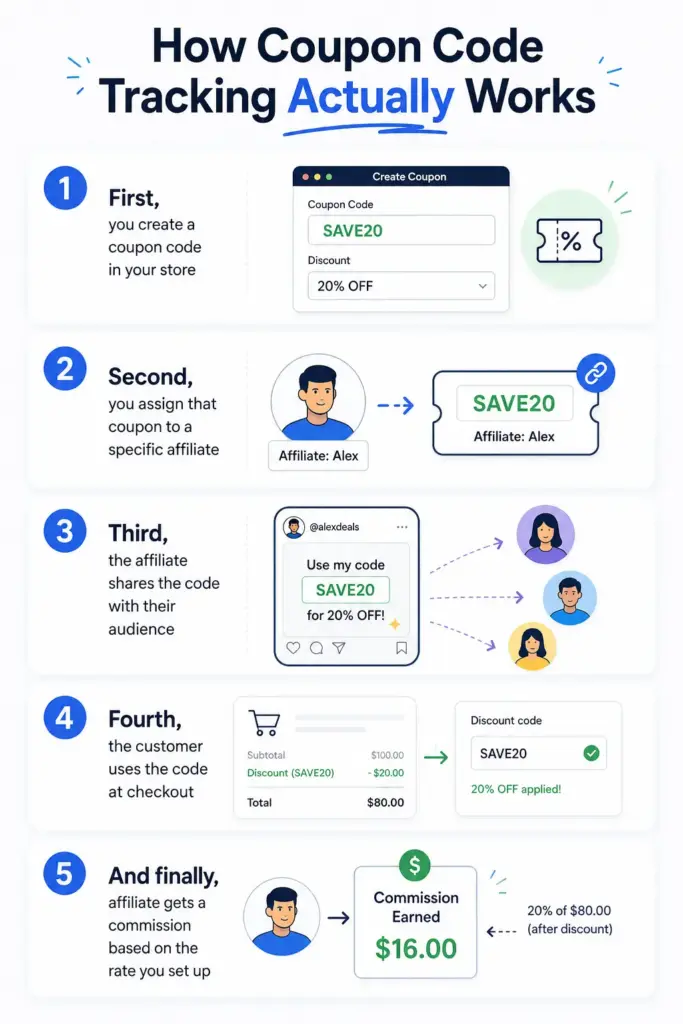
First, you create a coupon code in your store. This could be in WooCommerce, Easy Digital Downloads, FluentCart, or any other platform you use.
Second, you assign that coupon to a specific affiliate. The affiliate’s name or ID gets attached to the code in the background.
Third, the affiliate shares the code with their audience. They might mention it in a YouTube review, post it on Instagram, or send it through their email list.
Fourth, the customer uses the code at checkout. They get their discount, and the system records that the coupon was used.
And finally, the affiliate gets a commission based on the rate you set up. Everything is tracked automatically, so you do not have to chase down spreadsheets.
Here is a quick example. Let’s say your affiliate Sarah promotes your WooCommerce store. You create a coupon called SARAH20 that gives customers 20 percent off. When someone uses SARAH20 at checkout, Sarah earns her commission. No referral link needed.
That is the magic of coupon tracking. It works in the background while your affiliates focus on doing what they do best.
Coupon Code Tracking vs Referral Link Tracking
Well, this is the question most store owners ask. Should you use referral links or coupon codes? Let’s compare them side by side.
| Scenario | Referral Link Tracking | Coupon Code Tracking |
| Customer uses an ad blocker | Often fails | Works fine |
| Customer switches devices | Tracking lost | Still works |
| Customer clears cookies | Tracking lost | Still works |
| Promotion through podcasts or YouTube | Hard to share long URLs | Easy to say a short code |
| Offline promotion (events, flyers) | Not practical | Works perfectly |
| Customer types the URL directly | No tracking | Coupon still tracks |
| Customer gets a discount | No discount built in | Built-in discount incentive |
| Blog reviews and banner ads | Excellent fit | Less natural |
So which one wins? Honestly, both. Referral links work great for blog reviews, banners, and digital content. Coupon codes win for podcasts, influencer deals, offline marketing, and word of mouth.
The smartest move is to use both. Give your affiliates a referral link for online content and a branded coupon code for everything else. This way, you catch sales no matter where the customer comes from.
Explore More: 8 Affiliate Tracking Methods & How They Actually Work on WordPress
Why WordPress Store Owners Should Care About Coupon Tracking
If you run a WordPress store, this matters more than you might think. Here is why.
- Privacy laws are getting stricter every year. Browsers like Safari and Firefox already block third-party cookies. Chrome is moving in the same direction. That means referral link tracking is slowly losing its accuracy.
- Influencer marketing is changing too. Most influencers prefer short, memorable codes over long URLs. A YouTuber saying “use code MIKE15” sounds way more natural than “click the link in my bio.”
- Offline marketing is also a big deal. If you sponsor a podcast, run a print ad, or speak at a conference, you cannot expect people to type a long URL from memory. A short coupon code is much easier to remember and use.
- And here is the cleanest part. Coupon tracking gives you better data. You can see exactly which coupons drive the most sales, which affiliates are converting, and where your revenue is coming from. That kind of clarity is hard to get with link tracking alone.
If you are looking for a WordPress-native way to set this up, FluentAffiliate handles it out of the box with its branded coupon code feature. We will get into the setup soon.
Real Use Cases for Affiliate Coupon Codes
Let me show you some real-world examples where coupon code tracking shines. These are the situations where store owners often lose commissions if they only use referral links.
Influencer marketing partnerships. Say you partner with a YouTuber who reviews WordPress plugins. They mention your tool, give their audience a personalized code, and earn a commission for every sale. No need to share a complicated link.
Podcast and YouTube sponsorships. Think about how often you hear “use code SHOW20 for 20 percent off” in podcasts. That is coupon code tracking in action. It works because listeners can remember the code easily.
Print, events, and conferences. If your affiliate speaks at a WordPress event or hands out flyers, they cannot rely on a URL. A short coupon code on a business card or slide works perfectly.
Word of mouth referrals. Existing customers love sharing their favorite tools. When they recommend your product, a simple code like “tell them I sent you, use ALEX15” feels natural and friendly.
Customer ambassador programs. Reward your happy customers by giving them their own coupon. Every time someone in their network uses the code, they earn a little something back.
Subscription renewals. If you sell recurring products, coupons can track ongoing sales too. The affiliate keeps earning as long as the subscription stays active.
These are the moments where coupon code tracking pays off. It captures sales that would normally slip through the cracks.
How to Set Up Coupon Code Tracking in WordPress With FluentAffiliate
Alright, let’s get to the practical part. FluentAffiliate has a built-in feature called Branded Coupon Codes. It lets you assign a coupon to a specific affiliate in just a few clicks. Currently, this works with WooCommerce, Easy Digital Downloads, and FluentCart.
Before you start, make sure the user is already an approved affiliate in your FluentAffiliate program. You can do this from the Affiliates page in your admin dashboard.
Now, let’s walk through the setup for each platform.
Setting Up Coupon Tracking With WooCommerce
WooCommerce is the most common e-commerce platform on WordPress. Here is how to connect a coupon to an affiliate.
First, go to your WordPress dashboard and navigate to FluentAffiliate, then Settings, then Integration Settings. Find WooCommerce in the list and click the toggle to enable it.
Next, click Manage and check the box for “Enable Branded Coupon Codes for affiliates.” Save your settings.
Now, head to Marketing in your WordPress dashboard and click Coupons. You can either create a new coupon or edit an existing one.
On the coupon editor page, scroll down and look for the FluentAffiliate Coupon section. Click the dropdown and pick the affiliate’s name from the list.
Save the coupon. That is it. Every time a customer uses that coupon at checkout, the affiliate gets credit and earns their commission.
For more details, you can check the WooCommerce integration page.
Setting Up Coupon Tracking With FluentCart
FluentCart is a newer, lightweight e-commerce plugin. The process is just as smooth.
Enable the FluentCart integration in FluentAffiliate’s Integration Settings. Click Manage and turn on the branded coupon option.
Now go to FluentCart and click Coupons. Create or edit a coupon. Look for the Fluent Affiliate section on the right side of the editor. Click Select Affiliate and choose the affiliate’s name.
Save the coupon. That is it. Your affiliate is now connected to that coupon.
Check the FluentCart integration.
Setting Up Coupon Tracking With Easy Digital Downloads
If you sell digital products like ebooks, software, or templates with Easy Digital Downloads, the setup is just as simple.
Go to FluentAffiliate, then Settings, then Integration Settings. Toggle on Easy Digital Downloads. Click Manage and enable the “Enable Branded Coupon Codes for affiliates” option.
Then go to Downloads in your WordPress dashboard and click Discounts. Create a new discount or edit an existing one.
Scroll down to the FluentAffiliate Coupon section on the discount editor. Pick the affiliate from the dropdown. Save the discount.
Done. Now when someone uses that discount code, the affiliate earns a commission.
If you want a deeper walkthrough, the Easy Digital Downloads integration guide covers everything step by step.
Important Setup Notes
Before you assign coupons, double-check these things:
The user must already be an approved affiliate. You can manage this from the Affiliates page in the FluentAffiliate dashboard.
Only one affiliate can be assigned to a coupon at a time. So if multiple affiliates want unique codes, you need to create separate coupons.
Test the coupon yourself before sharing it. Run a quick test order to make sure the discount applies and the affiliate gets credit.
Common Mistakes to Avoid With Affiliate Coupon Tracking
Coupon code tracking sounds simple, and it is. But there are a few mistakes that can hurt your program if you are not careful.
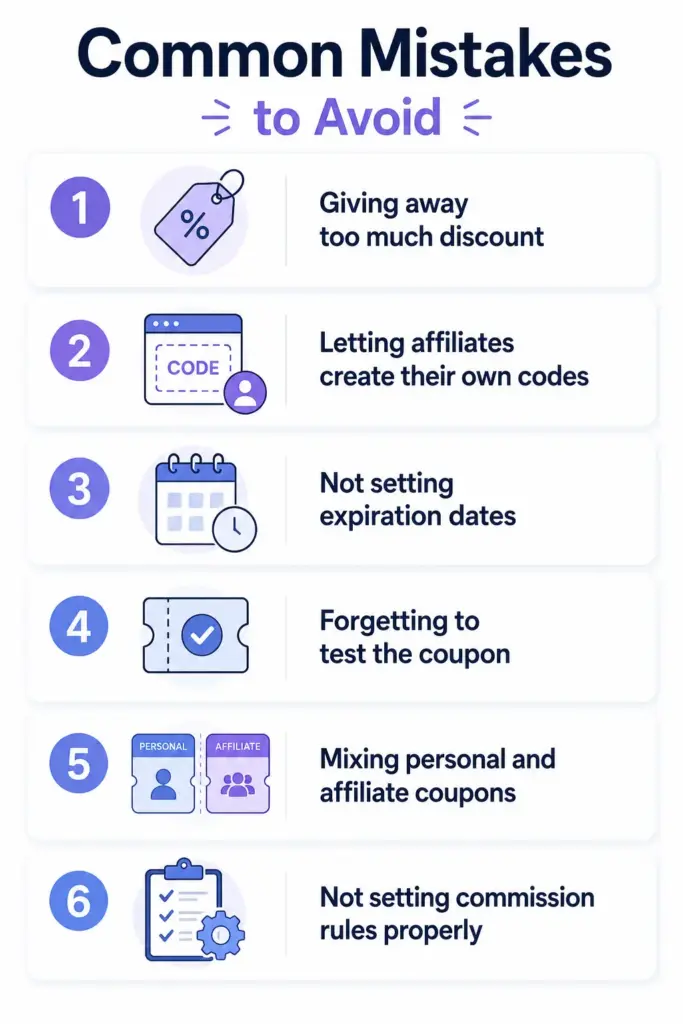
Giving away too much discount. A 50 percent off code might bring sales, but it also kills your margin. Most successful programs stick to 10 to 25 percent off. That is enough to drive conversions without eating your profit.
Letting affiliates create their own codes. This sounds friendly, but it creates a mess. You lose control over discount levels, expiration dates, and tracking. Always create the coupons yourself and assign them.
Not setting expiration dates. A coupon without an expiry can run forever. That is risky. Set time limits, especially for new affiliates or short campaigns.
Forgetting to test the coupon. This one is easy to overlook. Always place a test order to make sure the coupon discount applies and the affiliate actually gets credited.
Mixing personal and affiliate coupons. If you use the same coupon code for a sitewide promo and an affiliate, the tracking gets confused. Keep them separate.
Not setting commission rules properly. Coupons should follow the same commission logic as your regular affiliate program. Set this up clearly in your referral settings before going live.
Avoid these traps and your coupon tracking system will run smoothly.
Best Practices to Make Affiliate Coupon Codes More Effective
So you have set up coupon code tracking. Now, how do you make sure it actually drives sales? Here are some practical tips.
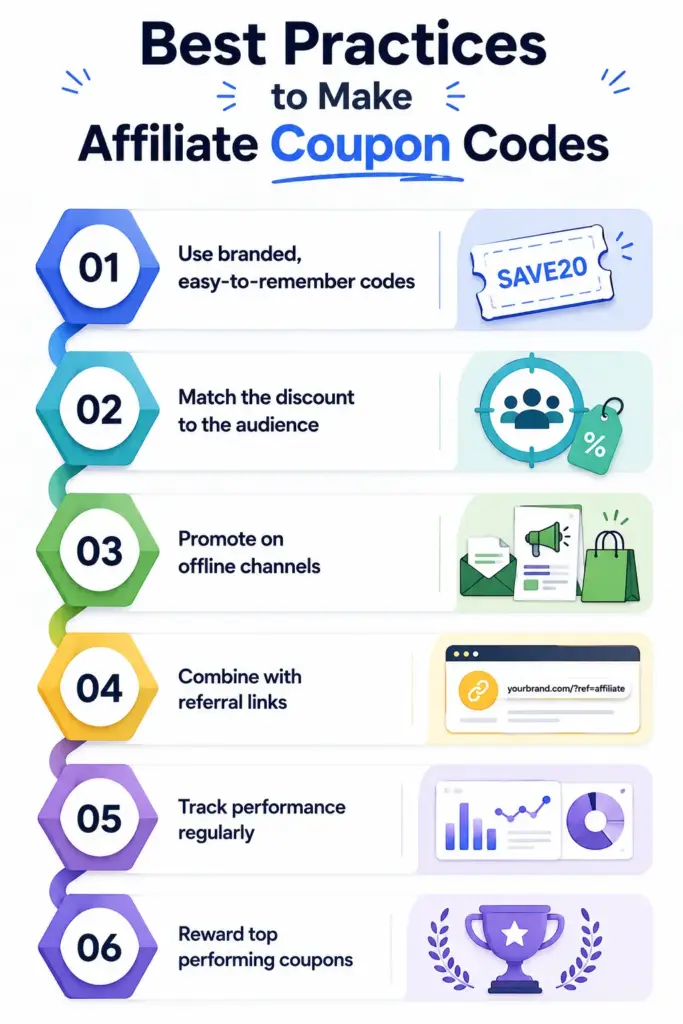
Use branded, easy-to-remember codes. Codes like JOHN20 or MIKE15 work way better than random strings like XJ27HQ. They feel personal and customers remember them.
Match the discount to the audience. A 10 percent discount might be enough for a high-priced product. For a low-cost item, you might need 20 or 25 percent to make it worth using.
Promote on offline channels. Coupons shine on podcasts, YouTube videos, print ads, and live events. Encourage your affiliates to use them in places where links cannot go.
Combine with referral links. Do not pick one over the other. Give your affiliates both options so they can match the format to the platform.
Track performance regularly. Check which coupons are driving sales and which are not. Use the data from your managing referrals section to spot trends.
Reward top performing coupons. If a specific code is bringing in a lot of sales, consider bumping up that affiliate’s commission. It builds loyalty and keeps them motivated.
These small changes can make a big difference in how well your coupon program performs.
Why FluentAffiliate Is a Strong Choice for Coupon Tracking on WordPress
Honestly, there are a lot of affiliate tools out there. Most of them are built for SaaS or Stripe-based businesses. If you run a WordPress site, those tools are overkill and often a pain to integrate.
FluentAffiliate is different because it is built for WordPress from the ground up. Here is why it stands out for coupon tracking.
It works directly inside your WordPress dashboard. No external SaaS, no API headaches, no monthly fees for tools you barely use.
It connects with the most popular WordPress e-commerce plugins, including WooCommerce, Easy Digital Downloads, and FluentCart. So you can pick the platform that fits your store.
The Branded Coupon Codes feature is built into the plugin. You do not need to install extra add-ons or write code. Just enable it and start assigning coupons.
You get one dashboard for everything. Affiliates, referrals, payouts, visits, and coupons all live in the same place. That makes managing your program way easier.
And it is affordable compared to SaaS competitors. Most affiliate platforms charge a percentage of every sale or a high monthly fee. FluentAffiliate is a flat plugin price, which keeps your costs predictable.
If you are already running your store on WordPress, this is the most natural fit you can find.
Final Thoughts
Coupon code tracking is not a replacement for referral links. It is the smarter, more reliable companion to them. Together, they catch every sale, no matter where the customer comes from.
If you run a WordPress store, you cannot afford to leave commissions on the table. Cookie tracking is fading, privacy rules are getting tighter, and influencers are leaning into branded codes more than ever. The brands that adapt early will win the next wave of affiliate growth.
The good news? You do not need a fancy SaaS tool to get started. FluentAffiliate makes it simple to assign branded coupons to your affiliates inside WooCommerce, Easy Digital Downloads, and FluentCart.
Ready to set up your first branded coupon? Try FluentAffiliate today and start tracking every sale the smarter way.
Frequently Asked Questions
Here are some of the most common questions regarding affiliate coupon code:
What is coupon code tracking in affiliate marketing?
Coupon code tracking is a way to credit affiliates for sales using a unique discount code instead of a referral link. When a customer uses the code at checkout, the system automatically attaches the sale to the affiliate who owns that code. It is reliable, works offline, and is not affected by cookie blockers.
How is coupon tracking different from referral link tracking?
Referral link tracking uses browser cookies to identify the affiliate, which can fail due to ad blockers, cleared cookies, or device switches. Coupon code tracking ties the attribution to the coupon itself, so it works at checkout no matter how the customer arrived. Most programs use both for maximum coverage.
Can I use coupon code tracking with WooCommerce?
Yes. FluentAffiliate supports coupon code tracking with WooCommerce through its Branded Coupon Codes feature. You can assign any WooCommerce coupon to a specific affiliate from the coupon editor. Once assigned, every time someone uses that coupon, the affiliate earns a commission automatically.
Do affiliates need a referral link if they have a coupon?
Not necessarily. A coupon code alone is enough to track sales. But giving affiliates both options is smarter. They can use the link for blog reviews and banner ads, and the coupon for podcasts, social media, and offline promotions. More options means more conversions.
Does FluentAffiliate support coupon code tracking?
Yes. FluentAffiliate offers built-in Branded Coupon Codes for WooCommerce, Easy Digital Downloads, and FluentCart. You can enable it from the Integration Settings of each platform, then assign a coupon to any approved affiliate directly from the coupon editor.
Can one affiliate have multiple coupon codes?
Yes, an affiliate can have multiple coupons assigned to them. For example, you might give one affiliate a 20 percent off code for general use and a 30 percent off code for a special launch. However, each individual coupon can only be assigned to one affiliate at a time.
Is coupon code tracking better for influencer marketing?
For influencer marketing, yes. Influencers usually share content on platforms like YouTube, Instagram, podcasts, and TikTok where long URLs do not work well. A short, branded coupon code is easier to mention out loud, remember, and type at checkout. That is why most modern influencer campaigns rely on coupon codes.





Add your first comment to this post