
8 Affiliate Tracking Methods & How They Actually Work on WordPress

Affiliate tracking sounds simple from the outside. Someone clicks a link, buys something, and the affiliate gets paid.
But once you actually run a program on WordPress, you quickly realize there are many tracking methods, and not all of them work the same way. Some are dying.
Some are stronger than ever. This guide breaks them all down in plain language, with real WordPress examples.
Key Takeaways: Affiliate Tracking Methods
- Affiliate tracking is simply the process of identifying the affiliate, following the visitor, and crediting the sale.
- Third-party cookies are fading. First-party cookies and server-side tracking are the future of reliable attribution.
- Coupon code tracking is the most underrated method in 2026 because it works without cookies and is perfect for influencers.
- Most successful WordPress affiliate programs combine three or four tracking methods rather than relying on just one.
- Custom landing pages give your top affiliates clean branded URLs that convert better than generic referral links.
- A conversion shortcode is the easiest way to track sales from non-integrated payment tools on WordPress.
- FluentAffiliate brings cookie tracking, branded coupon codes, custom landing pages, UTM capture, conversion shortcodes, and multi-domain tracking together in one self-hosted WordPress plugin.
What Affiliate Tracking Actually Means (in plain English)
Let’s keep this simple. Affiliate tracking is just the system your site uses to figure out three things:
- Which affiliate sent the visitor
- What that visitor did on your site
- Whether the visitor’s action should pay out a commission
That’s really it. Everything else, the cookies, the pixels, the postbacks, the coupons, is just a different method of doing those three things. Some methods rely on the visitor’s browser. Some rely on your server. Some skip the visitor’s device entirely and use coupon codes instead.
In a way, affiliate tracking is like a relay race. The affiliate hands off the visitor, your site catches them, and somewhere down the line, a sale happens. The tracking method is the baton. If it gets dropped, the affiliate doesn’t get credit.
For WordPress site owners, the good news is that you don’t need to build any of this from scratch. A solid affiliate plugin handles it for you. The harder part is understanding which method fits your business, so you can set it up properly and avoid losing referrals.
Why Affiliate Tracking Has Changed
Honestly, this part matters more than most blogs admit. Affiliate tracking has shifted a lot over the last two years, and if you set up your program the way people did in 2020, you’re probably losing sales without knowing it.
Here’s what changed:
- Third-party cookies are slowly fading out. Browsers like Safari and Firefox already block them by default. Chrome still allows some, but the trend is clear.
- First-party cookies, the ones your own domain sets, are now the safer choice for affiliate tracking.
- Ad blockers and privacy extensions are more popular than ever.
- Privacy laws like GDPR and CCPA mean you need to be careful about what you store and how long you store it.
- Server-side tracking is becoming the standard for serious programs because it doesn’t rely on the visitor’s browser at all.
For a WordPress site, this means two things. First, you want a self-hosted affiliate plugin that sets its own first-party cookies. Second, you should not rely on a single tracking method. The best programs in 2026 combine two or three methods at once so nothing gets missed.
Learn More: How Do Affiliate Links Track Customer Purchases?
8 Affiliate Tracking Methods That Still Work
Below are the tracking methods that still hold up well, especially for WordPress site owners. I’ll explain how each one works, where it fits, what it’s good at, where it falls short, and a real example you can use.
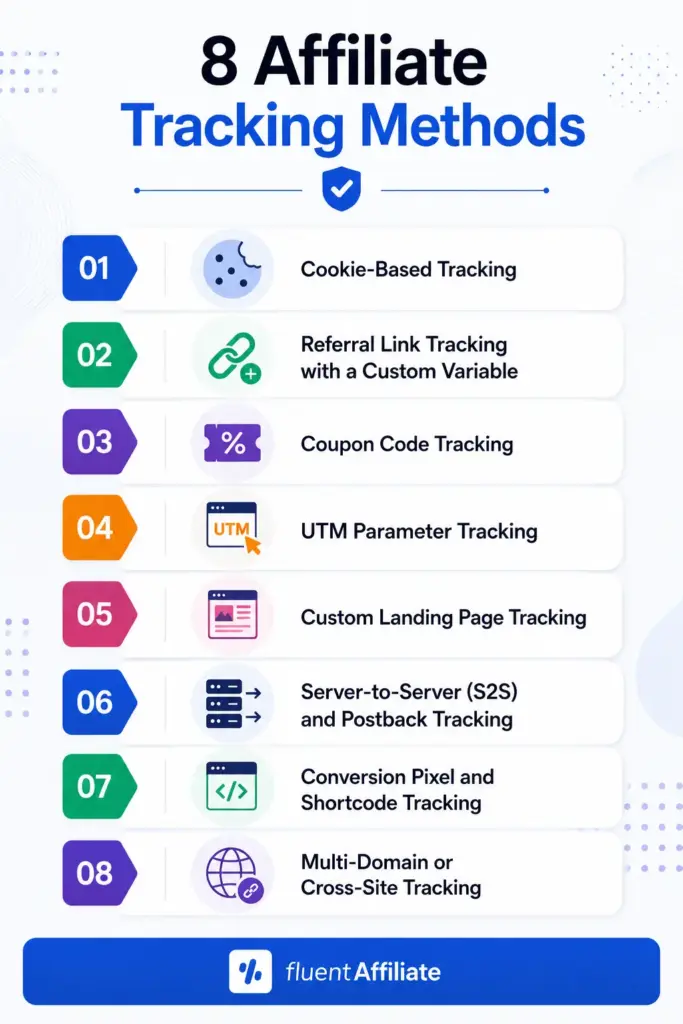
1. Cookie-Based Tracking (the most common one)
This is the classic. When a visitor clicks an affiliate link, your site drops a small file called a cookie in their browser. That cookie remembers the affiliate’s ID. If the visitor buys something within a set number of days, the system reads the cookie and credits the right affiliate.
How it fits on WordPress: Almost every affiliate plugin uses cookies as its main tracking layer. The trick is to use first-party cookies, set by your own domain, and to pick a reasonable cookie duration. Thirty days is the common default, but you can stretch it longer if your buying cycle is long.
Pros:
- Easy to set up and runs automatically
- Works well for most simple buying journeys
- Doesn’t need any technical work from the affiliate
Cons:
- Browsers and ad blockers can wipe cookies
- Visitors switching devices break the chain
- Privacy rules may require a consent banner
Real WordPress example: In FluentAffiliate, you can set the cookie duration from the Referral Settings page. You can also change the referral variable, so your affiliate links look like yoursite.com/?ref=alex instead of a random number.
2. Referral Link Tracking with a Custom Variable
This one works hand-in-hand with cookies, but it deserves its own spot because the link structure itself matters a lot. A referral link usually contains a small parameter that identifies the affiliate, like ?ref=123 or ?ref=username.
When someone clicks the link, your site reads that parameter, checks who it belongs to, and starts the tracking process.
How it fits on WordPress: This is the bread and butter of any WordPress affiliate program. You decide what the variable looks like. Some owners prefer numeric IDs for privacy. Others prefer usernames because they look cleaner and more brandable.
Pros:
- Clean and customizable
- Works across pages on your site
- Easy for affiliates to share
Cons:
- Long URLs can look messy if affiliates don’t shorten them
- Some users strip query parameters by habit
Real WordPress example: With FluentAffiliate, you can pick whether your links use the affiliate’s numeric ID or their WordPress username inside the Referral Settings. The plugin auto-generates these links for every approved affiliate.
3. Coupon Code Tracking (great for influencers)
This method skips the link entirely. Instead, each affiliate gets a unique discount code. When a customer types that code at checkout, your store gives them a discount and credits the affiliate.
This is huge for influencer partnerships. Influencers don’t always want to share long URLs in a podcast, a TikTok, or a printed flyer. A short branded code like ALEX20 works way better.
How it fits on WordPress: If you run WooCommerce, Easy Digital Downloads, or FluentCart, coupon code tracking is a must-have. It also helps when customers click an affiliate link but then come back later through a different device. As long as they use the code, the commission still lands with the right affiliate.
Pros:
- Doesn’t depend on cookies or browsers
- Perfect for offline, print, podcast, and video promotion
- Easy for customers to remember
Cons:
- Coupon codes can leak to coupon aggregator sites
- Affiliates may sometimes lose attribution if a customer uses a different coupon
Real WordPress example: FluentAffiliate supports branded coupon codes with WooCommerce, EDD, and FluentCart. You create a regular store coupon and just assign it to an approved affiliate in the FluentAffiliate Coupon field. Every time the code is used, that affiliate gets credit automatically.
4. UTM Parameter Tracking
UTMs are extra tags you add to a URL to track marketing details. You’ve probably seen them before. They look like ?utm_source=newsletter&utm_campaign=summer-sale.
In affiliate marketing, UTMs are not used to identify the affiliate directly. Your referral variable does that. UTMs are used to track which campaign, channel, or content piece is driving results.
How it fits on WordPress: UTMs are perfect when you want to know if an affiliate’s blog post is doing better than their YouTube video. You don’t pay differently, but you learn what’s actually working.
Pros:
- Gives you marketing-level insights, not just affiliate-level
- Works with any analytics tool
- No extra setup needed if your plugin captures UTMs
Cons:
- Extra parameters can make links longer
- Affiliates need a bit of guidance to use them properly
Real WordPress example: FluentAffiliate captures UTM parameters in the Visits log. You can filter visits by UTM source, medium, or campaign. So if your affiliate promotes a “summer-sale” campaign through their email newsletter, you can see exactly how that channel performs.
5. Custom Landing Page Tracking
This method is underrated. Instead of giving each affiliate a generic referral URL with a query string, you give them their own clean branded page on your site, like yoursite.com/partner/alex.
The page looks like a normal landing page. But behind the scenes, the system reads who the affiliate is and starts tracking the visitor.
How it fits on WordPress: This works great for your top partners, influencers, or content creators who want a more professional look. It also boosts conversion rates because clean URLs build more trust than long ones.
Pros:
- Looks more professional and brand-safe
- Higher click-through and conversion rates
- You can fully customize the page content for each affiliate
Cons:
- More setup work compared to standard links
- Best used for top affiliates, not every signup
Real WordPress example: FluentAffiliate has a shortcode called [fluent_aff_custom_landing ref=”X”]. You drop it on any page, set the affiliate ID or username, and that page becomes a tracking landing page for that specific affiliate. So you can build yoursite.com/partner/john and let John promote a clean URL instead of a referral string.
6. Server-to-Server (S2S) and Postback Tracking
Now we’re getting into the more advanced territory. Server-to-server tracking means your server talks directly to the tracking system without depending on the visitor’s browser at all. When a sale happens, your server fires a signal called a postback that confirms the conversion.
This is the most reliable tracking method in 2026 because it sidesteps cookies, ad blockers, and browser limitations completely.
How it fits on WordPress: For most small to medium WordPress sites, full S2S setup isn’t always needed. But the principle still applies. When your WooCommerce store completes an order, your site processes the conversion directly in PHP, not through the visitor’s browser. So in a way, every server-side WordPress plugin already gets some of the benefits of S2S tracking.
Pros:
- Doesn’t get blocked by browsers or extensions
- Works across devices and sessions
- Very accurate
Cons:
- More technical setup
- Not always needed for smaller programs
Real WordPress example: When FluentAffiliate’s integrations like WooCommerce, MemberPress, or LifterLMS detect a successful order, the conversion is processed on your server side. The plugin then connects the order back to the affiliate using stored data, not a browser pixel.
7. Conversion Pixel and Shortcode Tracking
Sometimes you sell something through a tool that doesn’t directly integrate with your affiliate plugin. Maybe it’s a payment system, a custom checkout, or a third-party service. In those cases, you still want to credit affiliates.
That’s where conversion tracking shortcodes or pixels come in. You drop a small piece of code or shortcode on the “Thank You” page that the customer lands on after payment. The shortcode tells your affiliate plugin: “Hey, a sale just happened. Credit the right affiliate.”
How it fits on WordPress: This is the bridge for non-integrated tools. If you have a custom checkout, you don’t have to give up on tracking affiliates. You just place a shortcode on your success page.
Pros:
- Fills the gap for non-integrated payment systems
- Lets you pass details like amount, order ID, and status
- Keeps everything inside your WordPress dashboard
Cons:
- Needs you to set up the success page properly
- A bit of manual work for the initial setup
Real WordPress example: FluentAffiliate provides a shortcode called [fluent_aff_conversion_script]. You can drop it on any “Thank You” page, and even pass values like the amount, reference ID, status, and conversion type. So even if you’re using a non-integrated payment tool, no referral gets lost.
8. Multi-Domain or Cross-Site Tracking
If you run more than one website and want affiliates to promote them all, you need cross-site tracking. The idea is simple. An affiliate can send traffic to your blog on one domain, but the final purchase happens on your store on another domain. You need the system to follow the visitor across both.
How it fits on WordPress: This is a common need for businesses that separate their content site from their store. Maybe your blog is at blogsite.com and your store is at mainstore.com. You want one affiliate program to track sales from either entry point.
Pros:
- Lets affiliates promote your blog, store, or both
- Centralizes all data in one dashboard
- Works for content-led businesses
Cons:
- Needs a small helper plugin on each child site
- Requires a one-time setup to link the domains
Real WordPress example: FluentAffiliate has a Multi-Domain Management feature. You install a free helper plugin called FluentConnect on your child site, generate a token, and link the sites. After that, traffic from your blog can convert into commissions on your store, all tracked under the same affiliate.
How to Choose the Right Affiliate Tracking Method for Your WordPress Site
There is no single “best” method. The right one depends on what you sell and how customers buy. So let’s match the methods to common WordPress setups.
- If you run a WooCommerce or FluentCart store, you’ll want cookies, referral variables, and branded coupon codes as your core. Add UTMs if you want detailed insights and custom landing pages for top influencers.
- You run a membership site with MemberPress or Paid Memberships Pro, focus on cookies and referral links. Membership buyers tend to research more, so longer cookie durations help.
- You sell online courses with LifterLMS, TutorLMS, or LearnDash, the same rules apply, plus custom landing pages work great for instructor partnerships.
- You sell digital downloads with EDD, branded coupon codes are a strong choice because digital buyers are often nudged by short codes shared in newsletters and communities.
- You collect donations with GiveWP, cookies and per-campaign rates are the main tools. UTMs help you track which appeal drives the most contributions.
- You run a booking site with FluentBooking, cookies plus referral links handle most cases.
- You collect form payments with Fluent Forms or Paymattic, the conversion shortcode or direct form integration is the most reliable path.
- If you run multiple websites, you’ll need multi-domain tracking on top of everything else.
The takeaway is simple. Most WordPress site owners need three or four methods running together, not just one.
Common Affiliate Tracking Problems (and How to Fix Them)
Even with a solid setup, things can go wrong. Here are the most common issues and how to handle them.
Missed referrals because of blocked cookies. Fix this by using first-party cookies and adding coupon code tracking as a backup.
Visitors switching devices mid-journey. Cookies live on a specific browser, so if someone clicks on mobile and buys on desktop, the link can break. Coupon codes solve this neatly.
Duplicate attribution. When two affiliates send the same visitor, you need a rule. Most plugins let you pick between the first affiliate or the last affiliate. Decide upfront and document it in your terms.
Tracking lost on a custom checkout. Use a conversion shortcode on the success page so the sale still credits the affiliate.
Affiliates complaining about missing commissions. This is usually a cookie issue, a duration issue, or a non-integrated tool issue. Walk through each method, and you’ll usually find the gap.
Refunds and chargebacks. Make sure your plugin marks refunded orders so you don’t pay commissions on canceled sales. This is a basic feature, but worth checking.
How FluentAffiliate Handles Tracking on WordPress
FluentAffiliate combines several of the methods we just discussed into one plugin, which is exactly what a modern WordPress program needs.
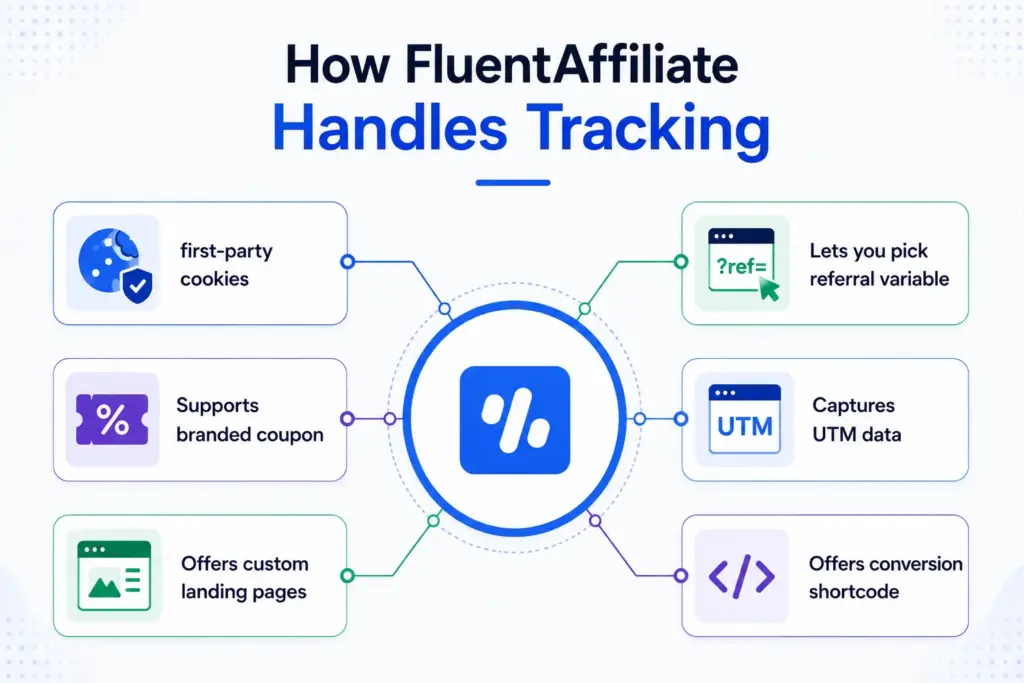
- FluentAffiliate uses first-party cookies for referral tracking, with a cookie duration you can control.
- Lets you pick your referral variable and link format.
- Supports branded coupon code tracking through WooCommerce, EDD, and FluentCart.
- Captures UTM data in the Visits log so you can see which campaigns work.
- Offers custom landing pages through a simple shortcode.
- It has a conversion shortcode for non-integrated systems. And it supports multi-domain tracking through the FluentConnect helper.
So whether you’re running a small membership site or a multi-site eCommerce business, the tracking layer is already built in. You don’t have to plug in three different tools to get the coverage you need.

Get the Best Affiliate Tracker for WordPress
Final Thoughts
Affiliate tracking is not one thing. It’s a set of small systems that work together to make sure the right affiliate gets paid for the right action. The site owners who do this well don’t pick a single method. They mix cookies, branded coupons, custom landing pages, UTMs, and server-side tracking based on what fits their products and audience.
The other thing worth remembering is that tracking will keep changing. Privacy rules will tighten. Browsers will keep limiting cookies. Ad blockers will keep growing. The smart move is to build your program on a setup that already handles these shifts, instead of patching things later.
If you’re running your program on WordPress, you want a plugin that takes care of all these layers in one place. That’s exactly what FluentAffiliate is built for. You can launch a full program, manage commissions, and stay on top of every tracking method without writing a line of code. If you’ve been thinking about starting or improving your affiliate program, this is a good time to give it a try.
Frequently Asked Questions
What is the most reliable affiliate tracking method in 2026?
The most reliable approach is a mix. First-party cookies handle most clicks, branded coupon codes catch device-switchers and offline buyers, and server-side tracking gives you accuracy across browsers. Relying on just one method leaves gaps. Combining two or three is what real programs do today.
How do affiliate cookies actually work?
When someone clicks an affiliate link, a small file called a cookie is saved in their browser. The cookie holds the affiliate’s ID. If the visitor buys something within the cookie’s set duration, like 30 days, the system reads the cookie and credits that affiliate. If the cookie is deleted or blocked, attribution can be lost.
Can I track affiliate sales without cookies?
Yes. Coupon code tracking, server-side tracking, and conversion shortcodes can all work without depending on cookies. Coupon codes are especially useful when affiliates promote offline or on platforms where links don’t perform well, like podcasts or print media.
What’s the difference between affiliate tracking and conversion tracking?
Affiliate tracking identifies which affiliate sent the visitor. Conversion tracking identifies whether the visitor completed a desired action, like a purchase or a signup. Most affiliate platforms handle both, but they are technically separate steps in the journey.
Does WordPress support all affiliate tracking methods?
Yes, but the support depends on the plugin you pick. A self-hosted plugin like FluentAffiliate supports cookie tracking, custom referral links, branded coupon codes, UTM capture, custom landing pages, conversion shortcodes, and multi-domain tracking. You don’t need extra tools to get full coverage.
How long should I set my affiliate cookie duration?
For most WordPress sites, 30 days is the standard. Membership and course businesses with longer sales cycles often use 60 or 90 days. Subscription-heavy programs may stretch further. Just remember, longer durations help affiliates earn more, which keeps them promoting your brand.





Add your first comment to this post