
FluentAffiliate: The Best Affiliate Plugin for Easy Digital Downloads (EDD)
Selling digital products on Easy Digital Downloads is the easy part. Getting strangers to talk about them? That’s where most store owners get stuck.
An affiliate program fixes that fast. The problem is, most affiliate plugins for EDD feel heavy, expensive, or built for a different era.
FluentAffiliate flips that. In this guide, you’ll see exactly why it fits EDD better than the usual options, and how to set it up step by step.
Key Takeaways: FluentAffiliate + EDD
- FluentAffiliate is the best affiliate plugin for Easy Digital Downloads because it offers native EDD integration, branded coupon tracking, and custom commission rates per product or category, all in one Pro license with no monthly fees.
- Setting up FluentAffiliate with EDD takes 5 simple steps: enable the integration toggle, configure commission settings, set custom product rates, assign branded coupons to affiliates, and generate referral links from the affiliate portal.
- Branded coupon codes let influencers promote your EDD products without sharing tracking links. Assign any EDD discount code to a specific affiliate in the Downloads > Discounts section, and every use auto-credits that affiliate.
- FluentAffiliate Pro includes affiliate creatives, custom landing page shortcodes, and multi-domain tracking in its core package. Competitors like AffiliateWP charge extra for these as separate add-ons.
- You can migrate from AffiliateWP, Solid Affiliate, or Affiliate Manager to FluentAffiliate without losing data, using either the built-in web UI migrator or a single WP CLI command.
What Makes a Great Affiliate Plugin for Easy Digital Downloads
Not every affiliate plugin works well with EDD. Some are bloated. Others charge a fortune. A few don’t even handle the basics well.
Here’s what you should actually look for:
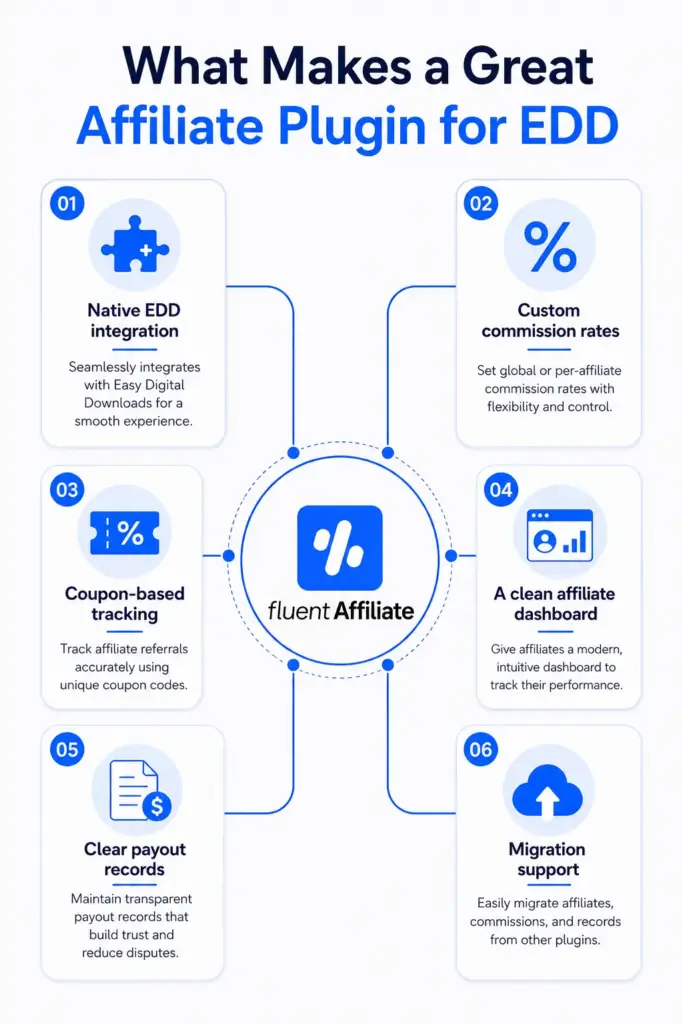
- Native EDD integration. The plugin should connect with EDD out of the box, with no custom code or developer help needed.
- Custom commission rates. You should be able to set different rates per product or per category. A $20 ebook and a $200 software bundle don’t deserve the same flat rate.
- Coupon-based tracking. This one is huge. Some affiliates (especially influencers) don’t share links. They share coupon codes. Your plugin should track that.
- A clean affiliate dashboard. Your affiliates need their own portal where they can grab links, see stats, and check payouts without bugging you.
- Honest payout records. The plugin doesn’t have to send money for you. But it should log every transaction and export reports cleanly.
- Migration support. If you already use AffiliateWP or another tool, switching shouldn’t mean losing your data.
That’s a tall order. Most plugins check two or three of those boxes. FluentAffiliate checks all six.
Meet FluentAffiliate: The Best Affiliate Plugin for Easy Digital Downloads (Factually)
FluentAffiliate is a WordPress plugin for building and managing affiliate programs right inside your dashboard. No third-party platform. No monthly SaaS fees. Just a plugin that lives on your site.
It’s made by WPManageNinja, the team behind FluentForms, FluentCRM, and FluentBooking. If you’ve used any of those, you already know the build quality. Fast, lightweight, and made for people who care about speed.
What I like about FluentAffiliate is that it treats EDD as a first-class integration, not an afterthought. The features are built with digital sellers in mind. Branded coupons for influencers. Custom rates per product or category. Even a way to disable commissions on upgrades, which is gold if you sell tiered plugins or software.
How FluentAffiliate Integrates with Easy Digital Downloads
This is the part everyone wants to see. Let’s walk through it slowly, so you can follow along even if you’ve never touched an affiliate plugin before.
Before you start, make sure both Easy Digital Downloads and FluentAffiliate Pro are installed and activated on your WordPress site. Done? Good. Let’s go.
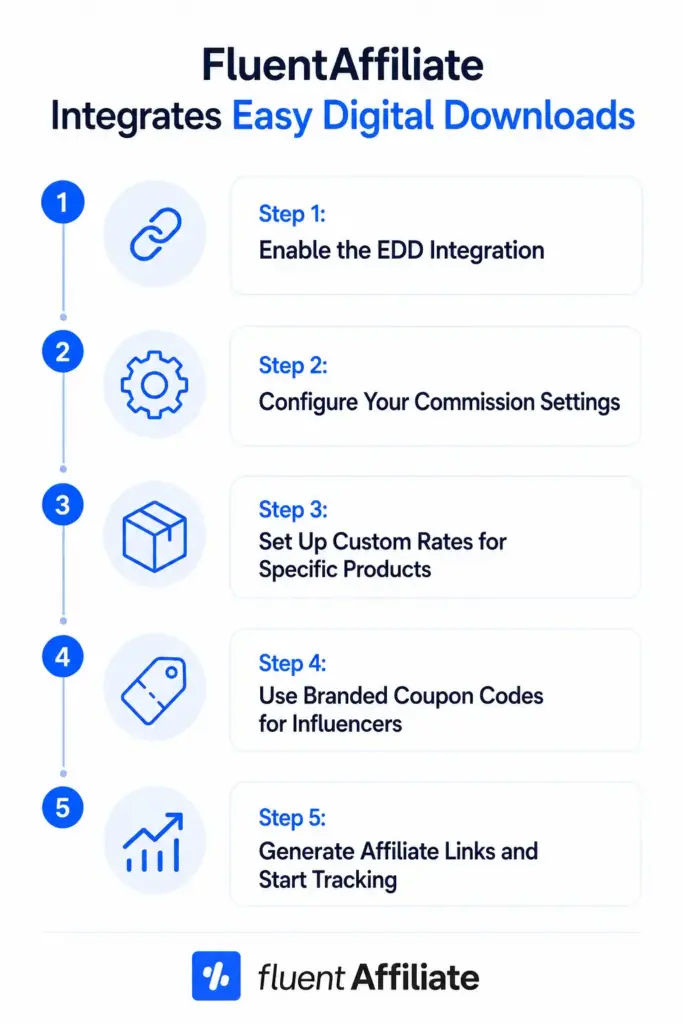
Step 1: Enable the EDD Integration
Log in to your WordPress dashboard.
In the left sidebar, find and click FluentAffiliate. This takes you to your main affiliate dashboard.
Click Settings in the top menu. Then, from the left side of the Settings page, click Integration Settings.
You’ll see a list of all the platforms FluentAffiliate connects with. Scroll until you find Easy Digital Downloads.
Next to EDD, there’s a toggle switch. Click it. It should turn on (usually shown in blue or green).
That’s it. Your EDD store is now connected to FluentAffiliate. Affiliates can start earning commissions on every digital download sale.
But don’t stop there. Click the Manage button next to the toggle. This opens the settings panel where the real customization happens.
Step 2: Configure Your Commission Settings
Inside the Manage panel, you’ll see a few checkboxes. Let’s go through them one by one.
The first option is “Enable Affiliate Integration for Easy Digital Downloads.” Check this box. It’s the master switch.
Below that, you’ll see “Enable Branded Coupon Codes for affiliates.” Check this if you want to assign discount codes to specific affiliates. (We’ll cover this in Step 4. It’s a game changer.)
Then there’s “Disable Referrals on Upgrades.” This one matters if you sell tiered products. Say someone buys your basic plugin for $49, then later upgrades to the pro version for $199. Do you want the affiliate to earn a commission on the upgrade? If yes, leave it unchecked. If no, check the box.
Finally, “Enable custom rate for specific product or categories.” Check this if you want to offer different commission rates for different EDD products. We’ll set this up in the next step.
Click Save Settings before moving on. Always click save. Nobody likes losing settings.
Step 3: Set Up Custom Rates for Specific Products
This is where FluentAffiliate really shines. Most plugins force you to use one commission rate across your whole store. FluentAffiliate lets you mix and match.
After enabling custom rates in Step 2, you’ll see a new section appear. Click the “+Add New Group” button.
You’ll get two choices: by specific products, or by specific categories. Pick whichever fits your store. If you have a handful of digital products, go by product. If you sell dozens of items in clear groups (like “Themes” and “Plugins”), categories are faster.
In the Select Products field, start typing the name of the product. A dropdown will show matches. Click the one you want.
Next, enter the commission rate in the box. Say you want to offer 30% on your premium course. Type 30.
Then pick the rate type from the dropdown. Choose Percentage (%) for a percentage of the sale, or Fixed for a flat dollar amount.
Want to add another rate for a different product? Click “+Add New Group” again. Repeat the process.
Made a mistake? Click the red delete icon on the right side of the row to remove it.
When you’re done, click Save Settings. Your custom rates are now live.
A quick real-world example. Let’s say you sell three products:
- An ebook at $19
- A WordPress plugin at $79
- A premium video course at $299
You could set 50% commission on the ebook (low margin, but easy to promote), 30% on the plugin (mid-tier), and 20% on the course (high value, smaller margin). Each rate makes sense for what you’re selling. FluentAffiliate handles all three without breaking a sweat.
Step 4: Use Branded Coupon Codes for Influencers
Here’s where things get interesting. Not every affiliate wants to share a link. Influencers, podcasters, and YouTubers often prefer giving their audience a coupon code instead. Something like “USE CODE SARAH20 FOR 20% OFF.”
FluentAffiliate handles this beautifully with EDD. Here’s how to set it up.
Make sure “Enable Branded Coupon Codes for affiliates” is checked in your EDD integration settings (Step 2). Saved? Good.
Now, in your WordPress dashboard, go to Downloads. Click Discounts in the submenu.
Set up the discount as you normally would. Pick the amount, set the type (percentage or flat), choose product restrictions, and so on.
Now scroll down on the discount editor page. You’ll find a section labeled “FluentAffiliate Coupon.”
Click the dropdown. Type the affiliate’s name (Sarah, in our example). Select them from the list.
Save the discount.
Done. From now on, every time someone uses the code “SARAH20” at checkout, Sarah automatically gets credited with the referral. No tracking link needed. No cookies required.
Step 5: Generate Affiliate Links and Start Tracking
Once your settings are in place, your affiliates can start promoting your EDD products. They do this from their own affiliate dashboard.
Here’s what they’ll do (you can share this with them as a quick start guide):
Log in to the affiliate portal on your site.
Click the Links tab in the navigation menu.
In the “Generate Affiliate Link” box, paste the URL of the EDD product or page they want to promote.
Click Generate.
A unique affiliate link will appear. They click Copy.
That’s their link. They can share it on social media, in emails, in blog posts, anywhere they want.
There’s also a QR code option in the same section. They can download a custom QR code for offline promotion (think business cards or printed materials at events).
When someone clicks that link or scans the QR code and buys, the affiliate gets credit. Simple as that.
Standout Features That Make FluentAffiliate the Best Choice for EDD
Beyond the basics, FluentAffiliate has a few features that really stand out for digital product sellers. Let me walk you through them.
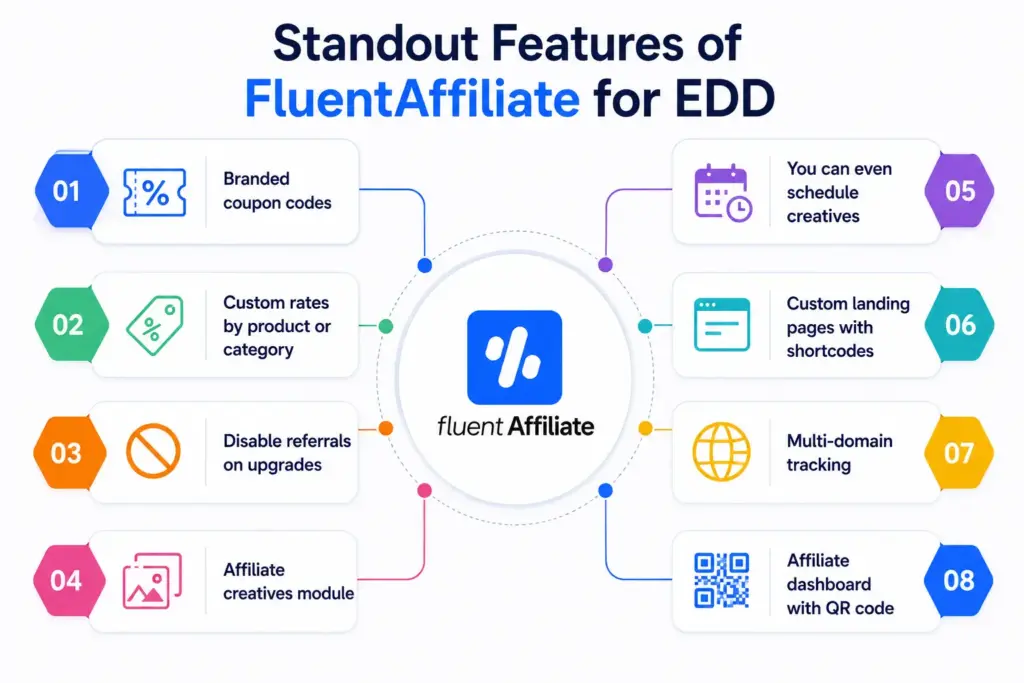
Branded coupon codes. We covered this in Step 4, but it’s worth saying again. Coupon-based affiliate tracking is rare. Many EDD plugins still don’t support it well. FluentAffiliate makes it one-click easy.
Custom rates by product or category. Already mentioned. But the flexibility goes deep. You can stack rules, mix percentages and fixed amounts, and even override the global rate for specific products.
Disable referrals on upgrades. If your EDD store uses a tiered model (like basic, pro, agency), this setting prevents double commissions. Your affiliate gets paid for the initial sale, not for upgrades the customer chooses later. Saves you money and avoids confusion.
Affiliate creatives module. This is a goldmine. You can upload banners, ad images, QR codes, and text links in one central library. Your affiliates log in, grab the assets they want, and share them with their tracking link already baked in. No more emailing banners back and forth.
You can even schedule creatives. Got a Black Friday sale running from November 25 to December 1? Schedule the creative to go live and disappear automatically. Affiliates won’t promote outdated offers.
Custom landing pages with shortcodes. FluentAffiliate gives you a shortcode that turns any WordPress page into a branded landing page for a specific affiliate. Instead of a generic referral URL with ?ref= at the end, you can give your top affiliate a clean link like yoursite.com/partner/sarah. Looks more professional, builds trust, and still tracks every sale.
The shortcode looks like this: [fluent_aff_custom_landing ref=”2″]. Just replace the number with the affiliate’s ID, drop it on a page, and you’re done.
Multi-domain tracking. If you run a blog on one domain and your EDD store on another, FluentAffiliate can connect both. An affiliate sends a visitor to your blog, the visitor reads a review, clicks over to your store, and completes the purchase. The commission still gets credited correctly. That’s not something many plugins handle.
Affiliate dashboard with QR code. Your affiliates get a clean dashboard with everything they need. Their main referral link, a downloadable QR code, recent referral history, payout status, and performance metrics. They don’t have to chase you for updates.
FluentAffiliate vs AffiliateWP for EDD: An Honest Comparison
Let’s address the elephant in the room. AffiliateWP is the most well-known affiliate plugin for EDD. It’s been around forever and is even owned by the same team behind EDD. So how does FluentAffiliate compare?
Here’s an honest side-by-side based on the documentation and features.
| Feature | FluentAffiliate Pro | AffiliateWP |
| EDD native integration | Yes | Yes |
| Custom rates per product | Yes | Yes |
| Custom rates per category | Yes | Yes |
| Branded coupon tracking | Yes (built in) | Yes (built in) |
| Affiliate creatives library | Yes | Add-on required |
| Custom landing page shortcodes | Yes | Add-on required |
| Multi-domain tracking | Yes | Add-on required |
| Built-in migration tools | Yes (from AffiliateWP, Solid Affiliate, Affiliate Manager) | No |
| Lifetime license available | Yes | Yes |
| Modern UI | Yes (built recently) | Older design |
The big takeaways:
FluentAffiliate includes features in its core Pro package that AffiliateWP charges extra for through add-ons. Affiliate creatives, landing pages, and multi-domain tracking all come baked in.
The dashboard feels more modern with FluentAffiliate. It was rebuilt recently with a cleaner UI, while AffiliateWP still carries some older design patterns.
Honestly, if you’re starting fresh on EDD today, FluentAffiliate gives you more value per dollar. If you’ve been on AffiliateWP for years and it works fine, you don’t have to switch. But if you’re shopping around, FluentAffiliate deserves a serious look.
Migrating to FluentAffiliate Without Losing Data
If you’re already running an affiliate program on another plugin, you’re probably worried about losing data when you switch. Don’t be. FluentAffiliate has built-in migration tools for three major platforms.
- AffiliateWP
- Solid Affiliate
- SliceWP
- Affiliate Manager
Here’s how migration works.
Option one is the web UI. Go to FluentAffiliate, then Settings, then Migrator Settings. Pick the source plugin from the dropdown. Click Migrate. A popup will show you a preview of how many affiliates, referrals, and other records will be imported. Confirm, and the process runs.
Option two is WP CLI, which is recommended for big stores. If you have command-line access to your site, you can run a single command like:
wp fluent_affiliate migrate_from_affiliatewp
It’s faster and more reliable for stores with thousands of records.
Pro Tips to Grow Your EDD Affiliate Program Faster
Setting up the plugin is the easy part. Growing the program takes a bit more thought. Here are a few tips that work well for digital product sellers.
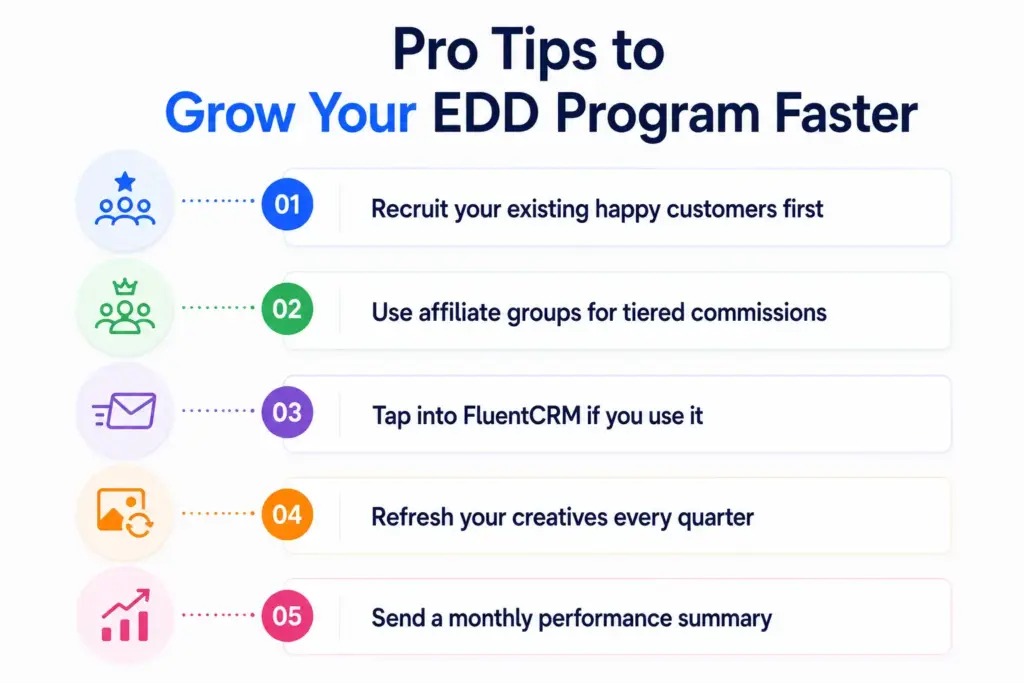
- Recruit your existing happy customers first. People who already bought your product are your best affiliates. They’ve used it. They love it. Send a simple email after a purchase: “Loved our plugin? Refer friends and earn 30% on every sale. Sign up here.” That’s it.
- Use affiliate groups for tiered commissions. FluentAffiliate lets you create groups with different commission rates. You can have a “Standard” group at 20%, a “Premium” group at 30%, and an “Influencer” group at 40%. Move top performers up as they earn. It motivates them to do more.
- Tap into FluentCRM if you use it. The FluentAffiliate and FluentCRM integration lets you automate emails for affiliate events. New affiliate signs up? Trigger a welcome email. New referral earned? Send a congratulations message. Payout sent? Notify them automatically. All hands-off.
- Refresh your creatives every quarter. Banners get stale. Update the affiliate creatives library every few months with new designs, seasonal offers, and fresh QR codes. Affiliates promote more when they have new assets to work with.
- Send a monthly performance summary. FluentAffiliate has built-in email digests for admin notifications. Set yours to monthly so you don’t miss any trends. And consider sending your top affiliates a quick monthly recap of their earnings. It builds the relationship.
Common Questions About FluentAffiliate and EDD
Do I need FluentAffiliate Pro for EDD? Yes. The Easy Digital Downloads integration is a Pro feature. The free version covers basic affiliate management but doesn’t include EDD support.
Can I track recurring commissions on EDD subscriptions?
Yes, but with one note. FluentAffiliate has a feature called Affiliate Commission on Subscription Renewal. It currently works with FluentCart. EDD subscriptions are handled through the standard referral logic on the original sale. If you sell recurring EDD subscriptions, double-check the latest changelog for updated support.
Does it work with my existing EDD coupons?
Yes. FluentAffiliate adds a new field to your existing EDD Discounts area. You can assign any coupon (new or existing) to a specific affiliate without recreating it.
How is data migrated from AffiliateWP?
Through the built-in migrator tool or a WP CLI command. Both options import affiliates, referrals, payouts, visits, and customer data. Always back up your database before running the migration.
Are there transaction fees?
No. FluentAffiliate doesn’t charge any transaction fees. You pay for the plugin license once, and you keep 100% of your sales.
Wrapping It Up
Affiliate marketing isn’t optional anymore. If you sell digital products on EDD and you’re not running a referral program, you’re competing with one hand tied behind your back. The math is clear. Affiliate marketing returns $12 to $15 for every $1 spent. Few channels come close.
FluentAffiliate makes the setup easy. Native EDD integration. Branded coupons for influencers. Custom commission rates. Affiliate dashboards that actually look modern. A migration tool that respects your old data.
If you’re starting a new EDD affiliate program or thinking about switching from an older plugin, give FluentAffiliate a real test. The setup steps in this guide take less than 30 minutes from start to finish. After that, your affiliates do the heavy lifting.Get started with FluentAffiliate today and turn your EDD store into a referral engine.



Add your first comment to this post